> ## Documentation Index
> Fetch the complete documentation index at: https://docs.kubex.ai/llms.txt
> Use this file to discover all available pages before exploring further.

# Analysis Details Modal

export const InlineImageWithText = ({src, href, children, width = 80, caption}) => {
  return <span className="inline-flex items-center gap-3 align-middle">
            <a href={href} className="inline-block border-b-0">
                <Frame caption={caption}>
                    <img src={src} alt="" className="object-contain align-middle " width={width} style={{
    minWidth: width
  }} />
                </Frame>
            </a>
            <span className="align-middle">{children}</span>
        </span>;
};

A hyperlink in the Analysis Details page opens this page showing significant details of the selected instance provided in a format that is easier to view and compare the current versus the recommended instance types.

## Instance Optimization Details

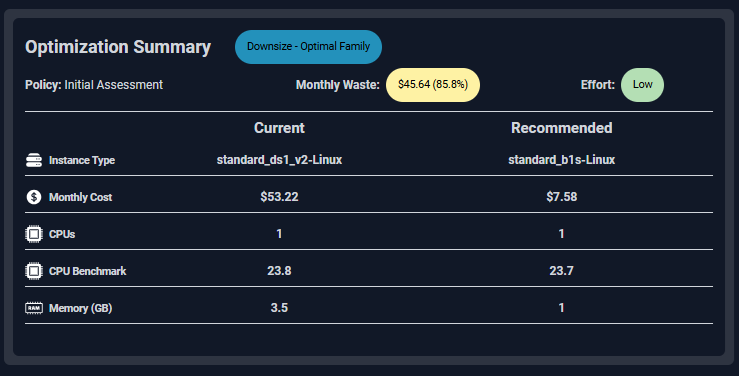
This card lists the following details for the current instance type.

<div style={{ width: "55%", display:"flex", flexDirection:"row", justifyContent: "space-between" }}>
  <ul>
    <li>Optimization Type</li>
    <li>Policy</li>
  </ul>

  <ul>
    <li>Monthly Waste</li>
    <li>Effort</li>
  </ul>
</div>

These additional details are listed for both instance types for easy comparison.

<div style={{ width: "55%", display:"flex", flexDirection:"row", justifyContent: "space-between" }}>
  <ul>
    <li>Instance Type</li>
    <li>Monthly Cost</li>
  </ul>

  <ul>
    <li>CPUs</li>
    <li>CPU Benchmark</li>
    <li>Memory (GB)</li>
  </ul>
</div>

Descriptions for all of these values are provided in the [Analysis Details](/docs-kubex/Content/Cloudex/AI_Analysis_Details_Tab-Cloud) table.

### Impact Analysis and Recommendation Report

The Impact Analysis and Recommendation report provides a PDF version of the instance details. You can easily share this report with the application owner to share your proposed sizing recommendations.

<div style={{ width: "100%", display:"flex", flexDirection:"row", alignItems:"center", justifyContent: "space-between", gap: "6px" }}>
  <div>
    <Frame caption="Figure: Generating the Impact Analysis and Recommendation Report">
      <img src="https://mintcdn.com/densify/nLYqHgk8d7rz4lmT/images/docs-kubex/Content/Cloudex/03000026_304x121.png?fit=max&auto=format&n=nLYqHgk8d7rz4lmT&q=85&s=11c227aa7d07ab7fc424da866ee225e3" style={{width: "304",height: "121"}} width="304" height="121" data-path="images/docs-kubex/Content/Cloudex/03000026_304x121.png" />
    </Frame>

    <Frame caption="Figure: Downloading the PDF">
      <img src="https://mintcdn.com/densify/nLYqHgk8d7rz4lmT/images/docs-kubex/Content/Cloudex/03000027_304x121.png?fit=max&auto=format&n=nLYqHgk8d7rz4lmT&q=85&s=778cb2c53cb6bd620d0c9ade26220ab3" style={{width: "304",height: "121"}} width="304" height="121" data-path="images/docs-kubex/Content/Cloudex/03000027_304x121.png" />
    </Frame>
  </div>

  <div>
    <Note>
      Note:  This report is not available for Azure VM Scale Sets.
    </Note>

    Click the link in the upper corner to download a PDF version of the Impact Analysis and Recommendation Report.

    <br />

    <br />

    When you click the button, a popup opens with a link. You can save or download the file.

    <br />

    <br />

    The filename will be `<cloud provider>_<system name>_<system_id>.pdf`
  </div>
</div>

<Frame caption="Figure: Instance Optimization Summary Details">
  <img src="https://mintcdn.com/densify/nLYqHgk8d7rz4lmT/images/docs-kubex/Content/Cloudex/03000020.png?fit=max&auto=format&n=nLYqHgk8d7rz4lmT&q=85&s=80f224449385121114ee27cb9a076218" width="100%" data-path="images/docs-kubex/Content/Cloudex/03000020.png" />
</Frame>

## System Information

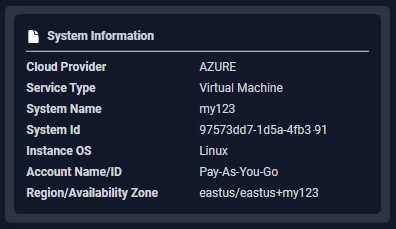
This card indicates identifying details for the selected instance.
<div style={{ width: "100%", display:"flex", flexDirection:"row", alignItems:"center", gap: "6px" }}>
  <Frame caption="Figure: System Information Card">
    <img src="https://mintcdn.com/densify/nLYqHgk8d7rz4lmT/images/docs-kubex/Content/Cloudex/03000021.png?fit=max&auto=format&n=nLYqHgk8d7rz4lmT&q=85&s=9879e08ea9dd933f92a61544b4623940" width="100%" data-path="images/docs-kubex/Content/Cloudex/03000021.png" />
  </Frame>

  <ul>
    <li>Cloud Provider</li>

    <li>
      <a href="/docs-kubex/Content/Cloudex/AI_Analysis_Details_Table-Cloud#service-type">
        Service Type
      </a>
    </li>

    <li>System Name</li>
    <li>Instance ID</li>
    <li>Instance OS</li>
    <li>Account Name/ID</li>
    <li>Region/Availability Zone</li>
  </ul>
</div>

## Status Overview

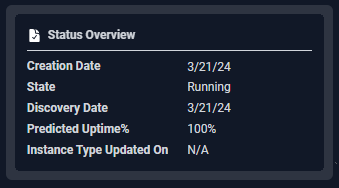
This card indicates the status of the current instance.

<Frame caption="Figure: Status Overview">
  <img src="https://mintcdn.com/densify/nLYqHgk8d7rz4lmT/images/docs-kubex/Content/Cloudex/03000022.png?fit=max&auto=format&n=nLYqHgk8d7rz4lmT&q=85&s=69c7bea46c5d727f2edc6978f83b3536" width="100%" data-path="images/docs-kubex/Content/Cloudex/03000022.png" />
</Frame>