> ## Documentation Index
> Fetch the complete documentation index at: https://docs.kubex.ai/llms.txt
> Use this file to discover all available pages before exploring further.

# Policies Tab

Policy settings allow you to consider service levels, business, operational, technical requirements that impact your day-to-day operation and map these considerations to Kubex's analytics which then generate recommendations to improve performance and reduce overall cost of running your container environments. Kubex provides tunable policies based on industry best practices.

You can review your policy settings with your account manager, if required.

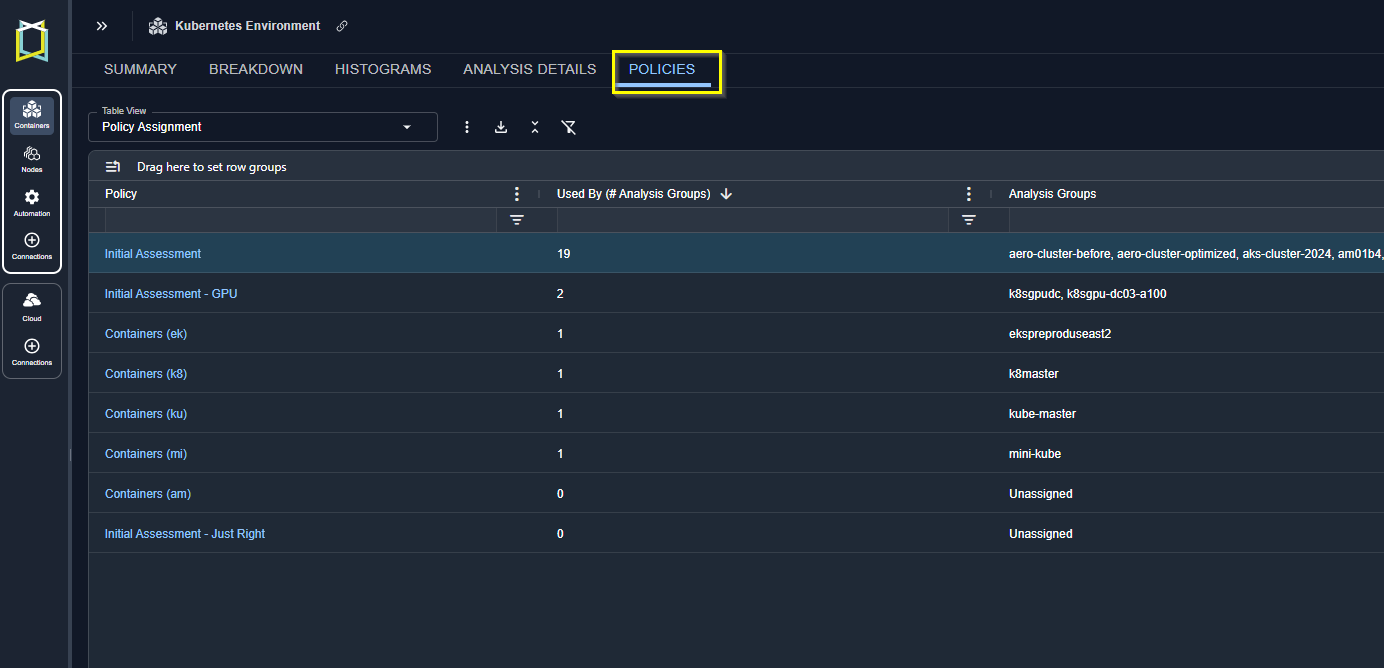
The Policies report provides details of the policies that are applied to the selected scope of systems. The content of the table is based on your selection in the tree viewer and your view and filter settings.

<Frame caption="Figure: Policies Tab">
  <img src="https://mintcdn.com/densify/qkPZFArjNU_c5QkI/images/docs-kubex/Content/Kubex/03000136_484x288.png?fit=max&auto=format&n=qkPZFArjNU_c5QkI&q=85&s=ba81ded7129c0ecc670f4a43f93863b1" alt="" width="1384" height="668" data-path="images/docs-kubex/Content/Kubex/03000136_484x288.png" />
</Frame>

You can create filters at the column or table level. See [Using Table Column Features](/docs-kubex/Content/Kubex/Using_Table_Column_Features).
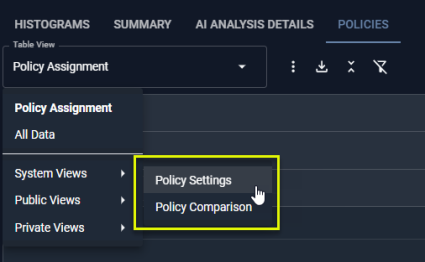
Two system views provide commonly used reports:
<ul>
  <li>Policy Settings--Shows you commonly used policy settings, their current values and a description.</li>
  <li>Policy Comparison--Shows you policy settings and their current values in a vertical list.</li>
</ul>

Descriptions of the policy settings are provided in the <a href="https://kubex-docs.s3.us-east-2.amazonaws.com/Kubex-Container-Policy-Guide.pdf" target="_blank">Policy Reference Guide</a>.

<Frame caption="Figure: Policy System Views">
  <img src="https://mintcdn.com/densify/It6BkcRegrIhp2zo/images/docs-kubex/Content/Kubex/03000137_425x262.png?fit=max&auto=format&n=It6BkcRegrIhp2zo&q=85&s=ca868cb3f36d86f638fa9f52ebee68aa" alt="" width="425" height="262" data-path="images/docs-kubex/Content/Kubex/03000137_425x262.png" />
</Frame>

The default policy report provides the following details:

<Accordion title="Table: Policy Details Table">
  <table>
    <thead>
      <tr>
        <th>
          Column
        </th>

        <th>
          Description
        </th>
      </tr>
    </thead>

    <tbody>
      <tr>
        <td>
          Policy
        </td>

        <td>
          The policy name.
        </td>
      </tr>

      <tr>
        <td>
          Used By (Number of Analysis Groups)
        </td>

        <td>
          The number of environment analysis that are using this policy. .
        </td>
      </tr>

      <tr>
        <td>
          Analysis Groups
        </td>

        <td>
          The names of the analysis groups using this policy.
        </td>
      </tr>
    </tbody>
  </table>
</Accordion>

## Policy Modal View

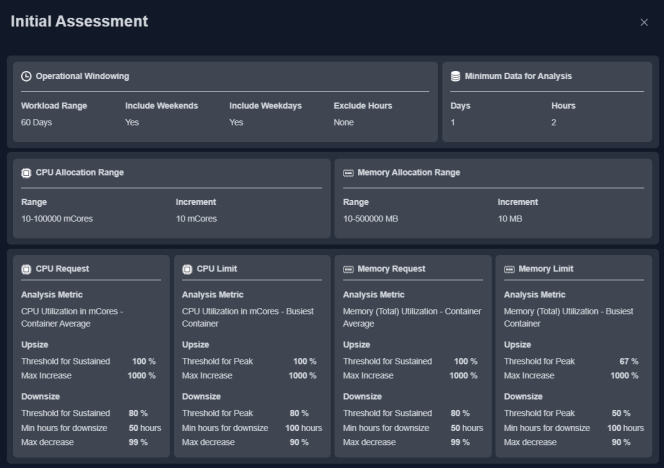
Clicking the policy hyperlink opens a summary view. The displayed settings are a subset of the complete policy. These are the most commonly tuned settings, that align the Kubex analysis to the specific requirements of your environments.

Policies can be edited here if you have the "policy\_admin" role. You can send a request to your Kubex account manager for edit access.

<Frame>
  <img src="https://mintcdn.com/densify/It6BkcRegrIhp2zo/images/docs-kubex/Content/Kubex/03000142_664x468.png?fit=max&auto=format&n=It6BkcRegrIhp2zo&q=85&s=8e36df4cca8dbea130303038964b7621" alt="" width="664" height="468" data-path="images/docs-kubex/Content/Kubex/03000142_664x468.png" />
</Frame>

#### Video Resources

<AccordionGroup>
  <Accordion title="Policy Defined Management">
    <iframe frameborder="0" height="310" src="https://player.vimeo.com/video/1057601036?badge=0&autopause=0&player_id=0&app_id=58479" width="550" />

    <a href="https://player.vimeo.com/video/1057601036?badge=0&autopause=0&player_id=0&app_id=58479" target="_blank">Policy Defined Management</a>
  </Accordion>

  <Accordion title="Using the Tree Viewer">
    <iframe frameborder="0" height="310" src="https://player.vimeo.com/video/1038945637?title=0&byline=0&portrait=0&badge=0&autopause=0&player_id=0&app_id=58479" width="550" />

    <a href="https://player.vimeo.com/video/1038945637?title=0&byline=0&portrait=0&badge=0&autopause=0&player_id=0&app_id=58479" target="_blank">Using the Tree Viewer</a>
  </Accordion>
</AccordionGroup>