> ## Documentation Index
> Fetch the complete documentation index at: https://docs.kubex.ai/llms.txt
> Use this file to discover all available pages before exploring further.

# Approving Cloud Recommendations

The ability to approve or pre-approve recommended actions, for the purpose of automation or manual implementation, can be achieved through the Instance Optimization Details report. For an automated self-optimizing solution, Kubex offers a framework to identify which instances are suitable for self-optimization based on Densify's recommended action and the effort to implement the action. When an instance is identified as requiring an optimizing action, you can approve or disallow the action. All instance optimization, instance approval, and self-optimizing details are accessible via the Kubex API, which is used to extract data for downstream processing, either manually or in an integrated infrastructure execution application, such as Terraform. See [Enabling Self-Aware Self-Optimizing Instances](./Enabling_Self-Aware_Self-Optimizing_Instances) for a high-level overview of this process.

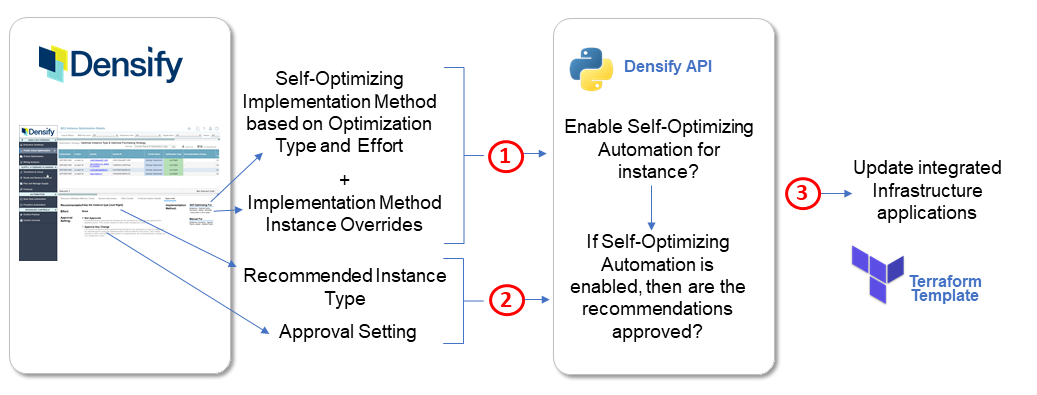
The Self-Optimizing Automation process flow is depicted in the diagram below.

<Accordion title="Figure: Self-Optimizing Automation Process Flow">
  <Frame>
    <img src="https://mintcdn.com/densify/uni34QsYZOpuZ7St/images/docs/WebHelp_Densify_Cloud/Content/Resources/Images/Cirba_SaaS/06000028.png?fit=max&auto=format&n=uni34QsYZOpuZ7St&q=85&s=38eb373a779b921c4dd8402ba2dda298" alt="" width="1037" height="395" data-path="images/docs/WebHelp_Densify_Cloud/Content/Resources/Images/Cirba_SaaS/06000028.png" />
  </Frame>
</Accordion>

1. Before using the Self-Optimizing Automation feature, the implementation method policies and any system overrides need to be configured to identify which Optimization Types (recommended actions) are allowed for self-optimization. In Densify, the Self-Optimizing Automation implementation method selected is dependent on the Optimization Type and may also depend on calculated Effort required to implement the recommendation. These are configured in the cloud environment policy.

Contact [\[email protected\]](/cdn-cgi/l/email-protection) for details on the Self-Optimizing Automation policy settings and system overrides for your environment.

2. For each instance recommendation, you can approve the move to a specific instance type or pre-approve any instance type recommendation. The default setting for each instance recommendation is "Not Approved".
3. The instance optimization, instance approval and self-optimizing details can be retrieved by the Kubex API for manual or automation purposes, such as updating Terraform templates for instance optimization automation.

Contact [\[email protected\]](/cdn-cgi/l/email-protection) if you want to explore Self-Optimizing Automation solutions using the Kubex API. You can also refer to the Kubex [API Reference Guide](https://www.densify.com/docs-api/Content/APIHome) for usage details and examples.

## Approvals Tab

The Approvals tab in the Instance Optimization Details report is available for the following cloud instances:

* AWS EC2
* AWS RDS
* AWS Spot Instances
* Azure Virtual Machines
* GCP Compute Engines

The approval setting is configured for a single instance at a time; bulk approvals are not allowed. The Approvals tab will not be available when you select multiple instances in the Instance Optimization Details report.

<Note>
  If there are conflicting instance details, then the Approvals tab will unavailable and an appropriate error will be displayed. For example, if optimization analysis was conducted for an instance and recommendations were provided, but the instance no longer exists, then an error will be displayed in the Approvals tab.
</Note>

### Filtering by Approval Setting

You can filter instances in supported reports with a specific Approval Setting through the Guest Filter. By default, instances with all Approval Settings are displayed. This filtering option is supported in the following cloud optimization reports:

* Public Cloud > Optimization Overview
* Public Cloud > AWS > EC2
* Public Cloud > AWS > RDS
* Public Cloud > AWS > Spot Instances
* Public Cloud > Azure > Virtual Machines
* Public Cloud > GCP > Compute Engines
* Instance Optimization Details

See [Using the Guest Filter](./Using_Guest_Filters) for details on the Guest Filter.

<Note>
  The guest filter supports dynamic filtering for the Approval Setting. If a new Approval Setting value has been set, the guest filter refreshes with the new value in the Kubex Console.
</Note>

## Reviewing the Approval Details

<Accordion title="">
  <table class="table_1">
    <col />

    <col />

    <thead>
      <tr>
        <th class="td_2">
          <p class="CiRBATableColumnText">Approval Properties </p>
        </th>

        <th class="td_2">
          <p class="CiRBATableColumnText">Description</p>
        </th>
      </tr>
    </thead>

    <tbody>
      <tr>
        <td class="td_3">
          <p class="CiRBATableText"><a name="Approval_ImplementationMethod" /><span class="CiRBAcharUIElement">Implementation Method</span></p>
        </td>

        <td class="td_3">
          <p class="CiRBATableText"> Specifies which Optimization Type is configured for <span class="CiRBAcharUIElement">Self-Optimizing</span> and for <span class="CiRBAcharUIElement">Manual</span> implementation for the selected instance.</p>
          <p class="CiRBATableText">An asterisk (<span class="CiRBAcharUIElement">\*</span>) next to the Optimization Type implies that <a class="RefToBookmarkNoPage MCXref xref xrefRefToBookmarkNoPage" href="#Approval_Effort"><u>Effort</u></a> is also taken into consideration. A note below the Optimization Type explains the effort level condition for enabling self-optimizing implementation method.</p>
          <p class="CiRBATableText">The initial Implementation Method configuration is based on the <span class="mc-variable Document.self_optimize variable">Self-Optimizing Automation</span> Setup policy. If there is an system attribute overrides for this specific instance, it will take precedence over the policy. </p>
          <p class="CiRBATableText" data-mc-conditions="CiRBA.SaaSOnly">Contact <span class="mc-variable Document.Support variable"><a class="__cf_email__" data-cfemail="b2e1c7c2c2ddc0c6f2f6d7dcc1dbd4cb9cd1dddf" href="/cdn-cgi/l/email-protection">\[email protected]</a></span> for information about your <span class="mc-variable Document.self_optimize variable">Self-Optimizing Automation</span> policy.</p>
          <p class="CiRBATableText">Click on the <a class="RefToBookmarkNoPage MCXref xref xrefRefToBookmarkNoPage" href="#Self_Opt_Auto_Overrides_btn"><u>Self-Optimizing Automation Overrides</u></a> button to edit system attributes for <span class="mc-variable Document.self_optimize variable">Self-Optimizing Automation</span> overrides in <span class="mc-variable Document.Densify variable">Densify</span>. </p>
        </td>
      </tr>

      <tr>
        <td class="td_3">
          <p class="CiRBATableText"><a name="Self_Opt_Auto_Overrides_btn" /><span class="CiRBAcharUIElement">Self-Optimizing Automation Overrides</span></p>
        </td>

        <td class="td_3">
          <p class="CiRBATableText">Click on this button to override <span class="mc-variable Document.self_optimize variable">Self-Optimizing Automation</span> attributes. This button takes you to the <span class="CiRBAcharUIElement">Edit Systems Attributes</span> tab in the <span class="mc-variable Document.Instance_Optimization_Details variable">Instance Optimization Details</span> lower pane, where you can modify the set of attributes in the  <span class="mc-variable Document.self_optimize variable">Self-Optimizing Automation</span> Overrides category for this particular instance.</p>
          <p class="CiRBATableText">See <madcap:conditionaltext data-mc-conditions="CiRBA.ScreenOnly"><a class="RefToBookmark MCXref xref xrefRefToBookmark" href="./Understanding_the_Instance_Details_Report#edit_system_attributes"><u>Understanding the Instance Optimization Details Report</u></a></madcap:conditionaltext> for details on how to override system attributes in <span class="mc-variable Document.Densify variable">Densify</span>. </p>
          <p class="CiRBATableText">If you make a system <span class="mc-variable Document.self_optimize variable">Self-Optimizing Automation</span> override, the result of the override will not update the <a class="RefToBookmarkNoPage MCXref xref xrefRefToBookmarkNoPage" href="#Approval_ImplementationMethod"><u>Implementation Method</u></a> for this specific instance until Kubex analysis has been performed and the reporting database tables have been updated.</p>
        </td>
      </tr>

      <tr>
        <td class="td_3">
          <p class="CiRBATableText"><a name="Approval_Recommendation" /><span class="CiRBAcharUIElement">Recommendation</span></p>
        </td>

        <td class="td_3">
          <p class="CiRBATableText">The recommended action. Usually this is a change from the current instance type to the recommended instance type of the selected instance.</p>
        </td>
      </tr>

      <tr>
        <td class="td_3">
          <p class="CiRBATableText"><a name="Approval_Effort" /><span class="CiRBAcharUIElement">Effort</span></p>
        </td>

        <td class="td_3">
          <p class="CiRBATableText">Specifies the effort level required to investigate and implement the Kubex recommendations. Effort for each instance is calculated using rule-driven analytics, based on factors (such as instance family change, storage change, data quality checks, feature changes, etc.) that can be configured in the policy settings and rule set which captures best practices. </p>
          <p class="CiRBATableText">Click the <span class="CiRBAcharUIElement">Effort Details</span> tab to view  the factors that contribute to the effort level. See <madcap:conditionaltext data-mc-conditions="CiRBA.ScreenOnly"><a class="RefToBookmark MCXref xref xrefRefToBookmark" href="./Understanding_the_Instance_Details_Report#Lower_Section"><u>Reviewing Specific Instance Details</u></a></madcap:conditionaltext>.</p>
          <p class="CiRBATableText">You can configure approvals to be based on the level of effort required to make the change, through the policy settings.</p>
        </td>
      </tr>

      <tr>
        <td class="td_3">
          <p class="CiRBATableText"><a name="Approval_Setting" /><span class="CiRBAcharUIElement">Approval Setting</span></p>
        </td>

        <td class="td_3">
          <p class="CiRBATableText">Specify the recommended action approval setting for the system in scope. </p>

          <ul class="ul_1">
            <li class="CiRBATableBullet"><span class="CiRBAcharStrong">Not Approved</span>—The recommended action is not approved for the selected system. This is the default for all instance recommendations. </li>
            <li class="CiRBATableBullet"><span class="CiRBAcharUIElement">Approve Change to \<instance type></span>—Approve the change to the specified instance type for the selected system, using the methods listed in <a class="RefToBookmarkNoPage MCXref xref xrefRefToBookmarkNoPage" href="#Approval_ImplementationMethod"><u>Implementation Method</u></a>. </li>
            <p class="CiRBATableText">After approving the specific change for the selected system, the approval setting will remain  until the recommendation has been implemented or the recommended action changes as a result of executing <span class="mc-variable Document.Densify variable">Densify</span> analytics; the approval setting will be reset back to the default setting ("Not Approved") in these cases.</p>
            <p class="CiRBATableNote" data-mc-autonum="<b>Note: </b>"><span class="autonumber"><span><b>Note: </b></span></span>This approval setting is not available when Optimization Type is "Just Right".</p>
            <li class="CiRBATableBullet"><span class="CiRBAcharUIElement">Approve to Terminate</span>—Approve to terminate the system in scope using the methods listed in <a class="RefToBookmarkNoPage MCXref xref xrefRefToBookmarkNoPage" href="#Approval_ImplementationMethod"><u>Implementation Method</u></a>. After approving to terminate the system, the approval setting will remain the same until the recommendation has been implemented or if there is a change in the recommended action from executing <span class="mc-variable Document.Densify variable">Densify</span> analytics; the approval setting will be reset back to the default setting ("Not Approved") in the latter case.</li>
            <p class="CiRBATableNote" data-mc-autonum="<b>Note: </b>"><span class="autonumber"><span><b>Note: </b></span></span>This approval setting is only available when Optimization Type is "Terminate" for the system in scope.</p>
            <li class="CiRBATableBullet"><span class="CiRBAcharUIElement">Approve Any Change</span>—Pre-approve any recommendation for this system using the methods listed in  <a class="RefToBookmarkNoPage MCXref xref xrefRefToBookmarkNoPage" href="#Approval_ImplementationMethod"><u>Implementation Method</u></a></li>
          </ul>

          <p class="CiRBATableText">After you set the approval setting, it will remain the same for the system in scope, until you modify it. In addition, <span class="CiRBAcharUIElement">Approve Change to \<instance type></span> and <span class="CiRBAcharUIElement">Approve to Terminate</span> options will be reset to <span class="CiRBAcharUIElement">Not Approved</span> if instance recommendations change after the next execution of <span class="mc-variable Document.Densify variable">Densify</span> analytics.</p>
        </td>
      </tr>

      <tr>
        <td class="td_3">
          <p class="CiRBATableText"><a name="Approval_Footer" />Footer</p>
        </td>

        <td class="td_3">
          <p class="CiRBATableText">The footer at the bottom of the Approvals tab provides the self-optimization status of the system in scope after the <a class="RefToBookmarkNoPage MCXref xref xrefRefToBookmarkNoPage" href="#Approval_Recommendation"><u>Recommendation</u></a>, <a class="RefToBookmarkNoPage MCXref xref xrefRefToBookmarkNoPage" href="#Approval_ImplementationMethod"><u>Implementation Method</u></a>, and <a class="RefToBookmarkNoPage MCXref xref xrefRefToBookmarkNoPage" href="#Approval_Setting"><u>Approval Setting</u></a> has been considered:</p>

          <ul class="ul_1">
            <li class="CiRBATableBullet"><span class="CiRBAcharStrong">ENABLED</span>—Self-Optimization is enabled for the selected system. This implies that the Optimization Type for the system in scope is set to "Self-Optimizing" for the Implementation Method and the recommendations are approved (i.e. "Approve Change ..." or "Approve Any Change" is set).</li>
            <li class="CiRBATableBullet"><span class="CiRBAcharUIElement">DISABLED</span>—Self-Optimization is disabled for the in scope system. This implies that <a class="RefToBookmarkNoPage MCXref xref xrefRefToBookmarkNoPage" href="#Approval_Setting"><u>Approval Setting</u></a> is "Not Approved" or <a class="RefToBookmarkNoPage MCXref xref xrefRefToBookmarkNoPage" href="#Approval_ImplementationMethod"><u>Implementation Method</u></a> is "Manual" for the system's Optimization Type.</li>
          </ul>

          <p class="CiRBATableNote" data-mc-autonum="<b>Note: </b>"><span class="autonumber"><span><b>Note: </b></span></span>If the "Destination for <span class="mc-variable Document.self_optimize variable">Self-Optimizing Automation</span>" property has been set in the policy, the value of the property will be displayed in the footer. </p>
        </td>
      </tr>
    </tbody>
  </table>
</Accordion>
