> ## Documentation Index
> Fetch the complete documentation index at: https://docs.kubex.ai/llms.txt
> Use this file to discover all available pages before exploring further.

# Viewing Cloud Optimization Reports - RDS

export const InlineImage = ({src, href, alt = "", size = "medium", customSize, position = "left", children}) => {
  const sizeClasses = {
    small: "w-6 h-6",
    medium: "w-8 h-8",
    large: "w-12 h-12",
    xlarge: "w-16 h-16"
  };
  const ImageComponent = () => <img src={src} alt={alt} className={customSize ? '' : sizeClasses[size]} style={{
    verticalAlign: 'baseline',
    display: 'inline-block',
    margin: '0',
    padding: '0',
    border: 'none',
    maxHeight: '1em',
    ...customSize ? {
      width: customSize,
      height: customSize
    } : {}
  }} />;
  const imageElement = href ? <a href={href} className="inline-block border-b-0 no-underline">
            <ImageComponent />
        </a> : <ImageComponent />;
  return <>
            {position === "left" && imageElement}
            {position === "left" && " "}
            {children}
            {position === "right" && " "}
            {position === "right" && imageElement}
        </>;
};

The results of Kubex analyses are summarized in the various cloud service opportunity reports. Through these optimization reports Kubex gives you the visibility to manage your workloads.

Cloud service opportunity reports are described in this topic for AWS RDS.

Details for the other tabs are provided in the following topics:

* AWS EC2--See [Viewing Cloud Optimization Reports](./Viewing_Cloud_Optimization_Reports)
* AWS Auto Scaling Groups--See
  [Working with Auto Scaling Groups](./Working_with_ASGs)
* Azure Virtual Machines--See [Viewing Cloud Optimization Reports](./Viewing_Cloud_Optimization_Reports)
* GCP Compute Engine--See [Viewing Cloud Optimization Reports](./Viewing_Cloud_Optimization_Reports)

<Note>
  Instances without adequate data to perform the required analyses are not included in these reports.
</Note>

The content of this tabular report is described in the following table:

<Accordion title="Table: Public Cloud Optimization Tabular Report">
  <table>
    <col />

    <col />

    <thead>
      <tr>
        <th>
          <p>Component / Column Name </p>
        </th>

        <th>
          <p>Description</p>
        </th>
      </tr>
    </thead>

    <tbody>
      <tr>
        <td>
          <p><a name="Reviewing_Count" />Count</p>
        </td>

        <td>
          <p>The number of instances listed in this column is a hyperlink that takes you to the <span class="mc-variable Document.Instance_Optimization_Details variable">Instance Optimization Details</span> page for the selected  group. For more information, see <madcap:conditionaltext data-mc-conditions="CiRBA.ScreenOnly"><a class="MCXref xref" href="./Understanding_the_Instance_Details__RDS_">Understanding the Instance Optimization Details for RDS</a></madcap:conditionaltext>.</p>
        </td>
      </tr>

      <tr>
        <td>
          <p><a name="Reviewing_OverallStatus" />Overall Status</p>
        </td>

        <td>
          <p>Identifies the overall status of the optimization results based on the <a class="RefToBookmarkNoPage MCXref xref xrefRefToBookmarkNoPage" href="#Reviewing_OptimizationType"><u>Optimization Type</u></a> and potential <a class="RefToBookmarkNoPage MCXref xref xrefRefToBookmarkNoPage" href="#Reviewing_MonthlySavings"><u>\$ Savings/Month</u></a>:</p>

          <p />

          <table>
            <col />

            <col />

            <tbody>
              <tr>
                <td>
                  <p>Optimal</p>
                </td>

                <td>
                  <p>These instance types are currently sized correctly and there are no costs savings for this group of systems.</p>
                </td>
              </tr>

              <tr>
                <td>
                  <p>Identified Risk</p>
                </td>

                <td>
                  <p>These instance types  are at risk. This status occurs when the savings amount is less than $0 (i.e. you need to spend money to mitigate risk).</p> <p>Identified Risk status is also indicated when the savings amount is $0, but optimization type is upscale, upsize, or upsize to optimal family. This situation occurs when services are inactive, however, they will need to be upscaled or upsized to mitigate risk when they resume activity.</p>
                </td>
              </tr>

              <tr>
                <td>
                  <p>Savings Opportunity</p>
                </td>

                <td>
                  <p>These instance types can provide saving opportunities that greater than $0. </p> <p>Savings opportunity status is also indicated when the savings amount is $0, but optimization type is terminate, modernize, modernize to optimal family, downscale, downsize, or downsize to optimal family. This situation occurs when services are inactive, but have a recommendation of terminate, modernize, downsize or downscale when they resume activity to save money.</p>
                </td>
              </tr>
            </tbody>
          </table>
        </td>
      </tr>

      <tr>
        <td>
          <p><a name="Reviewing_OptimizationType" />Optimization Type</p>
        </td>

        <td>
          <p>The recommended type for the group of instances. See <madcap:conditionaltext data-mc-conditions="CiRBA.ScreenOnly"><a class="RefToBookmark MCXref xref xrefRefToBookmark" href="./Understanding_the_Instance_Details_Report#Recommendation_Color-Coding"><u>Optimization Type Descriptions and Color-Coding</u></a></madcap:conditionaltext>.</p>
        </td>
      </tr>

      <tr>
        <td>
          <p><a name="Reviewing_CurrentInstance" />Current Instance Type</p>
        </td>

        <td>
          <p>The current catalog instance is listed. This value is based on the  data collected.</p>
        </td>
      </tr>

      <tr>
        <td>
          <p><a name="Reviewing_RecommendedInstance" />Recommended Instance Type</p>
        </td>

        <td>
          <p>This is the recommended catalog instance, based on optimization analysis.</p>
        </td>
      </tr>

      <tr>
        <td>
          <p>Recommended Purchasing Strategy</p>
        </td>

        <td>
          <p>This column is no longer used.</p>
        </td>
      </tr>

      <tr>
        <td>
          <p><a name="Reviewing_deferRecom" />Defer Recommendation Until Current RI Coverage Expires</p>
        </td>

        <td>
          <p>Defer recommendations until reserved instance coverage for this group expires. Values include:</p>

          <ul>
            <li>Yes--defer  recommendations due to RI coverage;</li>
            <li> No--do not defer recommendations; this is also the case for "Terminate" recommendations;</li>
            <li>"-" --not applicable; no change is listed for "Just Right" recommendations.</li>
          </ul>

          <p>This field is based on AWS Defer Recommendation settings. <madcap:conditionaltext data-mc-conditions="CiRBA.SaaSOnly">Contact <span class="mc-variable Document.Support variable"><a class="__cf_email__" data-cfemail="95c6e0e5e5fae7e1d5d1f0fbe6fcf3ecbbf6faf8" href="/cdn-cgi/l/email-protection">\[email protected]</a></span> to review your AWS Defer Recommendation settings.</madcap:conditionaltext></p>
        </td>
      </tr>

      <tr>
        <td>
          <p><a name="Reviewing_curRIExpDate" />Current RI Expiry Date</p>
        </td>

        <td>
          <p>RI data is no longer collected and this column is no longer in use. </p>
        </td>
      </tr>

      <tr>
        <td>
          <p><a name="Reviewing_EstimatedCost" />Current Estimated Cost (\$)</p>
        </td>

        <td>
          <p>The current estimated cost is determined by adding all the current estimated cost of each instance in the group. See  <madcap:conditionaltext data-mc-conditions="CiRBA.ScreenOnly"><a class="RefToBookmark MCXref xref xrefRefToBookmark" href="./Understanding_the_Instance_Details_Report#Details_EstimatedCost"><u>Current Estimated Cost (\$)</u></a> in the <span class="mc-variable Document.Instance_Optimization_Details variable">Instance Optimization Details</span> report</madcap:conditionaltext>.</p>
        </td>
      </tr>

      <tr>
        <td>
          <p>Recommended Estimated Cost (\$)</p>
        </td>

        <td>
          <p>The recommended estimated cost is calculated  by adding all the recommended estimated cost of each instance in the group. See  <madcap:conditionaltext data-mc-conditions="CiRBA.ScreenOnly"><a class="RefToBookmark MCXref xref xrefRefToBookmark" href="./Understanding_the_Instance_Details_Report#Details_RecEstimatedCost"><u>Recommended Estimated Cost (\$)</u></a> in the <span class="mc-variable Document.Instance_Optimization_Details variable">Instance Optimization Details</span> report</madcap:conditionaltext>.</p>
        </td>
      </tr>

      <tr>
        <td>
          <p><a name="Reviewing_MonthlySavings" />\$ Savings/Month</p>
        </td>

        <td>
          <p>The estimated current and recommended instance cost is used to calculate savings per month (i.e. current estimated cost - recommended estimated cost).</p>
        </td>
      </tr>

      <tr>
        <td>
          <p><a name="Reviewing_Effort" />Effort</p>
        </td>

        <td>
          <p>\[ High | Medium | Low | None ]</p>
          <p>This column describes the effort required to investigate and implement the Kubex recommendations. The displayed group effort is an average of all the calculated efforts for each instance (or service) in the group. Effort for each instance is calculated by rule-driven analytics based on factors  (such as family change, storage change, data quality checks, feature changes, etc.) that can be configured in the policy settings and rule set which captures best practices.</p>
        </td>
      </tr>

      <tr>
        <td>
          <p><a name="Reviewing_CPU" />Current vCPUs</p>
        </td>

        <td>
          <p>The current value for CPU allocation.</p>
        </td>
      </tr>

      <tr>
        <td>
          <p>Recommended vCPUs</p>
        </td>

        <td>
          <p>The recommended value for CPU allocation.</p>
        </td>
      </tr>

      <tr>
        <td>
          <p><a name="Reviewing_Memory" />Current Memory Allocation (GB)</p>
        </td>

        <td>
          <p>The current  value memory altion.</p>
        </td>
      </tr>

      <tr>
        <td>
          <p>Recommended Memory Allocation (GB)</p>
        </td>

        <td>
          <p>The recommended value for memory allocation.</p>
        </td>
      </tr>

      <tr>
        <td>
          <p><a name="Reviewing_Footnote" />Footnote</p>
        </td>

        <td>
          <p>A footnote at the bottom of the <span class="mc-variable Document.Optimization_Opportunity variable">optimization opportunity</span> report displays the total number of instances (subject to any guest filters applied) of the specific public cloud service type. The number of instances is a link to the <span class="mc-variable Document.Instance_Optimization_Details variable">Instance Optimization Details</span> page, showing an aggregate report that contains all recommendations of that service type in one view. For details on this page, see <madcap:conditionaltext data-mc-conditions="CiRBA.ScreenOnly"><a class="MCXref xref" href="./Understanding_the_Instance_Details__RDS_">Understanding the Instance Optimization Details for RDS</a></madcap:conditionaltext>.</p>
          <p class="CiRBATableNote" data-mc-autonum="<b>Note: </b>"><span class="autonumber"><span><b>Note: </b></span></span>If recommendation filters are applied, the total number of instances on the last page of the optimization report might not be the same as the total number of instances in the footnote; this is because the recommendation filters are not reflected in the footnote total.</p>
        </td>
      </tr>

      <tr>
        <td>
          <p>Sort By</p>
        </td>

        <td>
          <p>You can change the instance group order of the tabular <span class="mc-variable Document.Optimization_Opportunity variable">optimization opportunity</span> report by selecting one of the sort options in the top <span class="CiRBAcharStrong">Sort By</span> dropdown list. For details on sorting behavior, see <a class="RefToBookmark MCXref xref xrefRefToBookmark" href="#Sorting"><u>Sorting Options</u></a>.</p>
          <p class="CiRBATableNote" data-mc-autonum="<b>Note: </b>"><span class="autonumber"><span><b>Note: </b></span></span>If there is no data in the <span class="mc-variable Document.Optimization_Opportunity variable">optimization opportunity</span> tabular report, the Sort By section is not displayed.</p>
        </td>
      </tr>

      <tr>
        <td>
          <p><a name="Reviewing_SummaryTotal" />Summary Total</p>
        </td>

        <td>
          <p> In the top-right corner of tabular <span class="mc-variable Document.Optimization_Opportunity variable">optimization opportunity</span> reports, the total number of <span>Instances</span> and the <span>Savings/Month</span> for implementing the recommendations are displayed.  The total number of instances displayed is a total of all the analyzed instances with guest and recommendation filters applied. The amount of savings per month is based on filtered data and can be negative if there is higher upsizing cost.</p>
          <p class="CiRBATableNote" data-mc-autonum="<b>Note: </b>"><span class="autonumber"><span><b>Note: </b></span></span>If there is no data in the <span class="mc-variable Document.Optimization_Opportunity variable">optimization opportunity</span> tabular report, the Summary Total section is not displayed.</p>
        </td>
      </tr>
    </tbody>
  </table>
</Accordion>

## Filtering Options

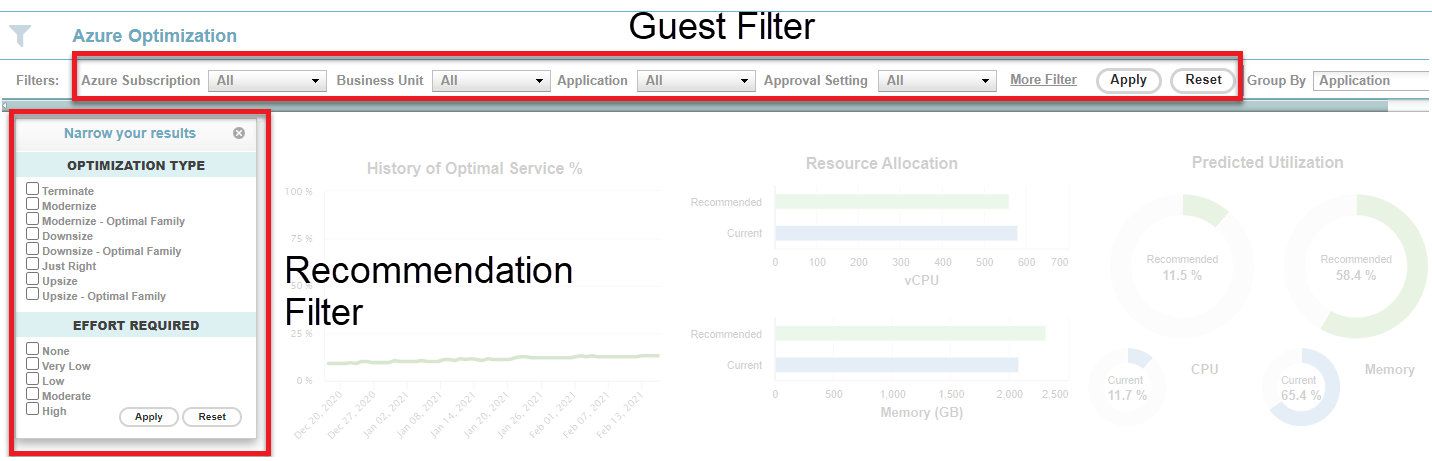
You can filter the optimization opportunity reports by guests and instance attributes, as well as by recommendations.

<Accordion title="Figure: Accessing Filter Options ">
  <Frame>
    <img src="https://mintcdn.com/densify/uni34QsYZOpuZ7St/images/docs/WebHelp_Densify_Cloud/Content/Resources/Images/Cirba_SaaS/03000111.png?fit=max&auto=format&n=uni34QsYZOpuZ7St&q=85&s=7cf620d406a05e720261785bf421a573" alt="" width="1432" height="461" data-path="images/docs/WebHelp_Densify_Cloud/Content/Resources/Images/Cirba_SaaS/03000111.png" />
  </Frame>
</Accordion>

<Note>
  The global filter is not applicable to the cloud optimization opportunities dashboards and is not accessible on these pages.
</Note>

### Filtering by Guest Attributes

You can filter instances using a set of attributes (e.g. Business Unit, Application).

This type of filtering is supported on the optimization opportunities dashboard tabs, as well as the Instance Optimization Details page when navigating from the Count column. The guest filters selected are persistent across platforms for those pages that support the guest filters (i.e. guest filters selected for AWS EC2 will apply to the AWS RDS, as well as the AWS Instance Optimization Details reports).

For details, see [Using the Guest Filter](./Using_Guest_Filters).

### Filtering by Recommendation

You can filter instances based on recommendations using the Recommendation Filter Menu. This filter allows you to narrow the results of your optimization reports based on recommended optimization type, effort required, monetary impact, and service characteristics. The resulting filtered report can be exported for external analysis using the Export to Excel (<InlineImage src="/images/docs/WebHelp_Densify_Cloud/Content/Resources/Images/Cirba_Reporting_Framework/03000053_17x18.png" />) tool.

For details, see [Using the Recommendation Filter Menu](./Using_the_Recommendation_Filter_Menu).

## Sorting Options

Optimization opportunity reports in tabular format can be sorted by the following fields:

* Overall Status & Optimization Type (default option)
* \$ Savings/Month High to Low
* \$ Savings/Month Low to High
* Effort None to Moderate
* Effort Moderate to None
* Current RI Expiry Date

Guest systems are sorted based on the selected sort option with any guest or recommendation filter already applied to the displayed results. The sorted report can be exported (in the same sort order) for external analysis using the Export to Excel tool.

The selected sort option is saved within the same session and will also be applied when you navigate to another tabular optimization opportunity report within the same public cloud environment supporting the sort option. For example, if you specify that the sort option is [Effort High to None](#Sort_EffortHighNone) in the AWS EC2 optimization opportunity report, then when you navigate to the AWS RDS optimization opportunity report, the sort option still remains [Effort High to None](#Sort_EffortHighNone). However, if you navigate to the Azure Virtual Machines optimization opportunity report, the sort option will change to the default or saved Azure sort option. When you logout of Densify, the sort option is reset to default sorting.

<Accordion title="Table: Sorting Option Descriptions">
  <table>
    <col />

    <col />

    <thead>
      <tr>
        <th>
          <p>Sort Options</p>
        </th>

        <th>
          <p>Description</p>
        </th>
      </tr>
    </thead>

    <tbody>
      <tr>
        <td>
          <p><a name="Sorting_default" />Overall Status & Optimization Type</p>
          <p>(default)</p>
        </td>

        <td>
          <div>
            <p>By default, the tabular optimization opportunity reports are ordered based on this option. Instances are first sorted by <a class="RefToBookmarkNoPage MCXref xref xrefRefToBookmarkNoPage" href="#Reviewing_OverallStatus"><u>Overall Status</u></a>, in the following order:</p>

            <ol class="ol_1">
              <li value="1">Savings Opportunity</li>
              <li value="2">Optimal</li>
              <li value="3">Identified Risk</li>
            </ol>

            <p>If the overall status is the same, then the secondary sort key is  <a class="RefToBookmarkNoPage MCXref xref xrefRefToBookmarkNoPage" href="#Reviewing_OptimizationType"><u>Optimization Type</u></a>, in the following order:</p>

            <ol class="ol_1">
              <li value="1">Terminate</li>
              <li value="2">Modernize</li>
              <li value="3">Modernize - Optimal Family</li>
              <li value="4">Downsize</li>
              <li value="5">Downsize - Optimal Family</li>
              <li value="6">Just Right</li>
              <li value="7">Upsize</li>
              <li value="8">Upsize - Optimal Family</li>
            </ol>

            <p>If overall status and optimization types are the same for the instances, then the tertiary sort key is by instance <a class="RefToBookmarkNoPage MCXref xref xrefRefToBookmarkNoPage" href="#Reviewing_Count"><u>Count</u></a>, in descending order.</p>
          </div>
        </td>
      </tr>

      <tr>
        <td>
          <p>\$ Savings/Month High to Low</p>
        </td>

        <td>
          <p>Sort by the <a class="RefToBookmarkNoPage MCXref xref xrefRefToBookmarkNoPage" href="#Reviewing_MonthlySavings"><u>\$ Savings/Month</u></a> field, from largest savings to lowest savings. If the savings are the same, then secondary sort is performed on <a class="RefToBookmarkNoPage MCXref xref xrefRefToBookmarkNoPage" href="#Reviewing_Effort"><u>Effort</u></a>, from None to High.</p>
        </td>
      </tr>

      <tr>
        <td>
          <p>\$ Savings/Month Low to High</p>
        </td>

        <td>
          <p>Sort by the <a class="RefToBookmarkNoPage MCXref xref xrefRefToBookmarkNoPage" href="#Reviewing_MonthlySavings"><u>\$ Savings/Month</u></a> field, from lowest savings to largest savings. If the savings are the same, then secondary sort is performed on <a class="RefToBookmarkNoPage MCXref xref xrefRefToBookmarkNoPage" href="#Reviewing_Effort"><u>Effort</u></a>, from None to High.</p>
        </td>
      </tr>

      <tr>
        <td>
          <p><a name="Sort_EffortNoneHigh" />Effort None to High</p>
        </td>

        <td>
          <p>Sort by <a class="RefToBookmarkNoPage MCXref xref xrefRefToBookmarkNoPage" href="#Reviewing_Effort"><u>Effort</u></a>, from None to High.  If the effort is the same, then secondary sort is performed on <a class="RefToBookmarkNoPage MCXref xref xrefRefToBookmarkNoPage" href="#Reviewing_MonthlySavings"><u>\$ Savings/Month</u></a>, from largest savings to lowest savings.</p>
        </td>
      </tr>

      <tr>
        <td>
          <p><a name="Sort_EffortHighNone" />Effort High to None</p>
        </td>

        <td>
          <p>Sort by <a class="RefToBookmarkNoPage MCXref xref xrefRefToBookmarkNoPage" href="#Reviewing_Effort"><u>Effort</u></a>, from High to None.   If the effort is the same, then secondary sort is performed on <a class="RefToBookmarkNoPage MCXref xref xrefRefToBookmarkNoPage" href="#Reviewing_MonthlySavings"><u>\$ Savings/Month</u></a>, from largest savings to lowest savings.</p>
        </td>
      </tr>

      <tr>
        <td>
          <p>Current RI Expiry Date</p>
        </td>

        <td>
          <p>Sort from earliest to latest date. Instance groups with no RI expiry dates are displayed at the end of the list.</p>
        </td>
      </tr>
    </tbody>
  </table>
</Accordion>
