> ## Documentation Index
> Fetch the complete documentation index at: https://docs.kubex.ai/llms.txt
> Use this file to discover all available pages before exploring further.

# Analysis Details Table

Use the Analysis Details report to review instance-specific details. The content of report is defined by your selection in the tree viewer. You can further filter the table content using the options on the column headers and from a flyout menu. See [Using Filters](/docs-kubex/Content/Kubex/Using_Filters).

See [Using Table Column Features](/docs-kubex/Content/Kubex/Using_Table_Column_Features) for details of using the features on this page, including exporting the content, right-click-context menu, moving columns, etc.

A [summary banner](/docs-kubex/Content/Kubex/Visualizing_Your_Data#summary-banner) at the top of the page provides an overall summary of the scope of selected systems.

### Pre-Configured Views

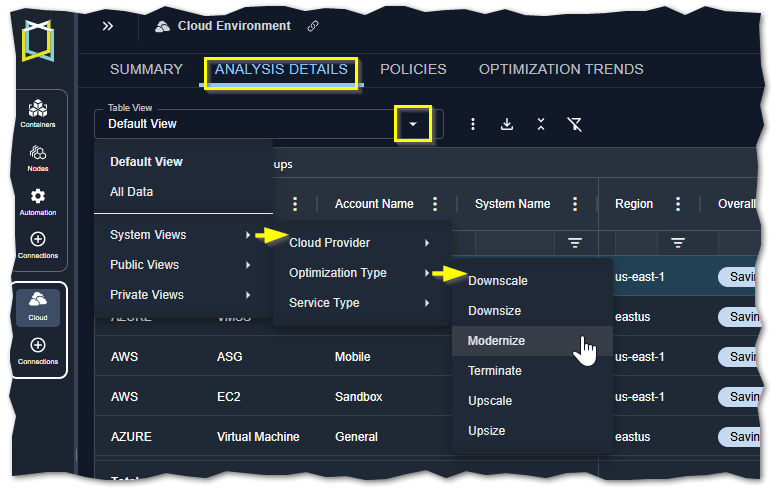
The following pre-configured table views are provided to quickly show various resources in your environment. Specific filters have been set and selected columns are displayed to highlight the specified set of data.

<Frame caption="Figure: Accessing the System Views on the Analysis Details Tab">
  <img src="https://mintcdn.com/densify/PbuHR0XRoCgbSmr4/images/docs-kubex/Content/Cloudex/03000018_418x233.png?fit=max&auto=format&n=PbuHR0XRoCgbSmr4&q=85&s=22127b520ebc03231e9690fc04fc942f" alt="" width="775" height="490" data-path="images/docs-kubex/Content/Cloudex/03000018_418x233.png" />
</Frame>

<br />

<Accordion title="Table: Pre-Configured Views">
  <table style={{ width: "80%", borderCollapse: "collapse" }}>
    <colgroup>
      <col style={{ width: "15%" }} />

      <col style={{ width: "20%" }} />

      <col style={{ width: "65%" }} />
    </colgroup>

    <thead>
      <tr>
        <th style={{ verticalAlign: "middle", textAlign: "center" }}>System View</th>
        <th style={{ verticalAlign: "middle", textAlign: "center" }}>View</th>
        <th style={{ verticalAlign: "middle", textAlign: "center" }}>Column</th>
      </tr>
    </thead>

    <tbody>
      <tr>
        <td style={{ verticalAlign: "middle", textAlign: "center" }}>N/A</td>
        <td style={{ verticalAlign: "middle", textAlign: "center" }}>Default View</td>
        <td style={{ verticalAlign: "middle", textAlign: "center" }}>This is the most commonly used set of columns that provide a summary view of your cloud instances. Significant risks or wasted spend are highlighted.</td>
      </tr>

      <tr>
        <td style={{ verticalAlign: "middle", textAlign: "center" }}>N/A</td>
        <td style={{ verticalAlign: "middle", textAlign: "center" }}>All Data</td>
        <td style={{ verticalAlign: "middle", textAlign: "center" }}>All columns and all data, as defined by your tree viewer selections are displayed. All filters are cleared. Horizontal and vertical scroll bars are displayed so you can navigate the content of the table.</td>
      </tr>

      <tr>
        <td style={{ verticalAlign: "middle", textAlign: "center" }} rowSpan="3">Cloud Provider</td>
        <td style={{ verticalAlign: "middle", textAlign: "center" }}>AWS</td>
        <td style={{ verticalAlign: "middle", textAlign: "center" }}>This view shows all AWS EC2, RDS and ASG instances.</td>
      </tr>

      <tr>
        <td style={{ verticalAlign: "middle", textAlign: "center" }}>Azure</td>
        <td style={{ verticalAlign: "middle", textAlign: "center" }}>This view shows all Azure VM and VMSS instances.</td>
      </tr>

      <tr>
        <td style={{ verticalAlign: "middle", textAlign: "center" }}>GCP</td>
        <td style={{ verticalAlign: "middle", textAlign: "center" }}>This view shows all GCP Compute instances.</td>
      </tr>

      <tr>
        <td style={{ verticalAlign: "middle", textAlign: "center" }} rowSpan="6">Optimization Type</td>
        <td style={{ verticalAlign: "middle", textAlign: "center" }}>Downscale</td>
        <td style={{ verticalAlign: "middle", textAlign: "center" }} rowSpan="6">This view displays all services of the specified optimization type within the selected scope, as defined by the tree viewer. i.e. Downsize, Upsize, etc.</td>
      </tr>

      <tr>
        <td style={{ verticalAlign: "middle", textAlign: "center" }}>Downsize</td>
      </tr>

      <tr>
        <td style={{ verticalAlign: "middle", textAlign: "center" }}>Modernize</td>
      </tr>

      <tr>
        <td style={{ verticalAlign: "middle", textAlign: "center" }}>Terminate</td>
      </tr>

      <tr>
        <td style={{ verticalAlign: "middle", textAlign: "center" }}>Upscale</td>
      </tr>

      <tr>
        <td style={{ verticalAlign: "middle", textAlign: "center" }}>Upsize</td>
      </tr>

      <tr>
        <td style={{ verticalAlign: "middle", textAlign: "center" }} rowSpan="6">Service Type</td>
        <td style={{ verticalAlign: "middle", textAlign: "center" }}>AWS ASG</td>
        <td style={{ verticalAlign: "middle", textAlign: "center" }} rowSpan="6">This view displays all services of the specified type within the selected scope, as defined by the tree viewer.</td>
      </tr>

      <tr>
        <td style={{ verticalAlign: "middle", textAlign: "center" }}>AWS ECS</td>
      </tr>

      <tr>
        <td style={{ verticalAlign: "middle", textAlign: "center" }}>AWS RDS</td>
      </tr>

      <tr>
        <td style={{ verticalAlign: "middle", textAlign: "center" }}>Azure VM</td>
      </tr>

      <tr>
        <td style={{ verticalAlign: "middle", textAlign: "center" }}>Azure VMSS</td>
      </tr>

      <tr>
        <td style={{ verticalAlign: "middle", textAlign: "center" }}>GCP - Compute Engine</td>
      </tr>
    </tbody>
  </table>
</Accordion>

### Instance Details Table

The content of the table as well as the totals at the bottom reflect applied filter settings. Not all columns may be displayed in your view, but you can add them at any time. See [Using Table Column Features](/docs-kubex/Content/Kubex/Using_Table_Column_Features).

<Accordion title="Table: Instance Optimization Details Tabular Report Columns">
  <table style={{width: "100%", borderCollapse: "collapse"}}>
    <colgroup>
      <col style={{width: "10%"}} />

      <col style={{width: "30%"}} />

      <col style={{width: "10%"}} />
    </colgroup>

    <thead>
      <tr>
        <th scope="col" style={{verticalAlign: "middle", textAlign: "center", padding: "8px", border: "1px solid #ccc"}}>
          <p>Column Name </p>
        </th>

        <th scope="col" style={{verticalAlign: "middle", textAlign: "center", padding: "8px", border: "1px solid #ccc"}}>
          <p>Description</p>
        </th>

        <th scope="col" style={{verticalAlign: "middle", textAlign: "center", padding: "8px", border: "1px solid #ccc"}}>
          <p>Available For</p>
        </th>
      </tr>
    </thead>

    <tbody>
      <tr>
        <td style={{verticalAlign: "middle", textAlign: "left", padding: "8px", border: "1px solid #ccc"}}>
          <p>Cloud Provider</p>
        </td>

        <td style={{verticalAlign: "middle", textAlign: "left", padding: "8px", border: "1px solid #ccc"}}>
          <p>The name of the public cloud provider. </p>
        </td>

        <td style={{verticalAlign: "middle", textAlign: "left", padding: "8px", border: "1px solid #ccc"}}>
          <p>All supported services</p>
        </td>
      </tr>

      <tr>
        <td style={{verticalAlign: "middle", textAlign: "left", padding: "8px", border: "1px solid #ccc"}}>
          <p><a name="Service_Type" />Service Type</p>
        </td>

        <td style={{verticalAlign: "middle", textAlign: "left", padding: "8px", border: "1px solid #ccc"}}>
          <p>The type of service being analyzed. Not all service types are supported. </p>

          <ul>
            <li>AWS EC2, RDS and ASGs </li>
            <li>Azure VM and VM Scale Sets </li>
            <li>GCP Compute Instances</li>
          </ul>
        </td>

        <td style={{verticalAlign: "middle", textAlign: "left", padding: "8px", border: "1px solid #ccc"}}>
          <p>All supported services</p>
        </td>
      </tr>

      <tr>
        <td style={{verticalAlign: "middle", textAlign: "left", padding: "8px", border: "1px solid #ccc"}}>
          <p>Account Name</p>
        </td>

        <td style={{verticalAlign: "middle", textAlign: "left", padding: "8px", border: "1px solid #ccc"}}>
          <p>The instance's parent account. This corresponds to:</p>

          <ul>
            <li>AWS Linked Account</li>
            <li>Azure Subscription</li>
            <li>GCP Project</li>
          </ul>
        </td>

        <td style={{verticalAlign: "middle", textAlign: "left", padding: "8px", border: "1px solid #ccc"}}>
          <p>All supported services</p>
        </td>
      </tr>

      <tr>
        <td style={{verticalAlign: "middle", textAlign: "left", padding: "8px", border: "1px solid #ccc"}}>
          <p>System Name</p>
        </td>

        <td style={{verticalAlign: "middle", textAlign: "left", padding: "8px", border: "1px solid #ccc"}}>
          <p>The name of the selected system. The name is a hyperlink that opens <a href="./AI_Analysis_Details_Modal-Cloud">modal view</a> with a detailed summary of the instance and comparison of the current and recommended instance types.</p>
        </td>

        <td style={{verticalAlign: "middle", textAlign: "left", padding: "8px", border: "1px solid #ccc"}}>
          <p>All supported services</p>
        </td>
      </tr>

      <tr>
        <td style={{verticalAlign: "middle", textAlign: "left", padding: "8px", border: "1px solid #ccc"}}>
          <p>Region</p>
        </td>

        <td style={{verticalAlign: "middle", textAlign: "left", padding: "8px", border: "1px solid #ccc"}}>
          <p>The region, in which this instance is located.</p>
        </td>

        <td style={{verticalAlign: "middle", textAlign: "left", padding: "8px", border: "1px solid #ccc"}}>
          <p>All supported services</p>
        </td>
      </tr>

      <tr>
        <td style={{verticalAlign: "middle", textAlign: "left", padding: "8px", border: "1px solid #ccc"}}>
          <p><a name="Details_OverallStatus" />Overall Status</p>
        </td>

        <td style={{verticalAlign: "middle", textAlign: "left", padding: "8px", border: "1px solid #ccc"}}>
          <p>Identifies the overall status of the optimization results based on <a href="#Details_OptimizationType"><u>Optimization Type</u></a> and potential <a href="#Details_SavingsMonth"><u>Analysis Details Table</u></a>:</p>

          <table style={{width: "100%", borderCollapse: "collapse"}}>
            <colgroup>
              <col style={{width: "30%"}} />

              <col style={{width: "70%"}} />
            </colgroup>

            <tbody>
              <tr>
                <td style={{backgroundColor: "#b4dfb4", border: "1px solid #C0C0C0", verticalAlign: "middle", textAlign: "left", padding: "8px"}}>
                  <p>Optimal</p>
                </td>

                <td style={{border: "1px solid #C0C0C0", verticalAlign: "middle", textAlign: "left", padding: "8px"}}>
                  <p>This instance is currently optimal. Optimization type is just right and there are no savings or risks for this instance.</p>
                </td>
              </tr>

              <tr>
                <td style={{backgroundColor: "#f36e4b", border: "1px solid #C0C0C0", verticalAlign: "middle", textAlign: "left", padding: "8px"}}>
                  <p>Identified Risk</p>
                </td>

                <td style={{border: "1px solid #C0C0C0", verticalAlign: "middle", textAlign: "left", padding: "8px"}}>
                  <p>This instance is currently at risk. This status typically occurs when the savings amount is less than \$0 (i.e.  you need to spend money to mitigate performance risk). </p>
                  <p>This may also occur when the  savings amount is \$0, but the optimization type is upscale, upsize, or upsize to optimal family. This situation occurs when services are inactive, but they will need to be upscaled or upsized when they resume activity to mitigate risk.</p>
                </td>
              </tr>

              <tr>
                <td style={{backgroundColor: "#c5d9f1", border: "1px solid #C0C0C0", verticalAlign: "middle", textAlign: "left", padding: "8px"}}>
                  <p>Savings Opportunity</p>
                </td>

                <td style={{border: "1px solid #C0C0C0", verticalAlign: "middle", textAlign: "left", padding: "8px"}}>
                  <p>This instance is currently over-provisioned. The possible savings amount is greater than $0.</p> <p>This may also occur when the savings amount is $0, but the optimization type is terminate, modernize, modernize to optimal family, downscale, downsize, or downsize to optimal family. This situation occurs when services are inactive, but have a recommendation of terminate, modernize, downsize or downscale, when they resume activity.</p>
                </td>
              </tr>
            </tbody>
          </table>
        </td>

        <td style={{verticalAlign: "middle", textAlign: "center", padding: "8px", border: "1px solid #ccc"}}>
          <p>All supported services</p>
        </td>
      </tr>

      <tr>
        <td style={{verticalAlign: "middle", textAlign: "left", padding: "8px", border: "1px solid #ccc"}}>
          <p>Instance Type</p>
        </td>

        <td style={{verticalAlign: "middle", textAlign: "left", padding: "8px", border: "1px solid #ccc"}}>
          <p>The current instance type, based on data collection.</p>
        </td>

        <td style={{verticalAlign: "middle", textAlign: "left", padding: "8px", border: "1px solid #ccc"}}>
          <p>All supported services</p>
        </td>
      </tr>

      <tr>
        <td style={{verticalAlign: "middle", textAlign: "left", padding: "8px", border: "1px solid #ccc"}}>
          <p>Recommended Instance Type</p>
        </td>

        <td style={{verticalAlign: "middle", textAlign: "left", padding: "8px", border: "1px solid #ccc"}}>
          <p>This is the recommended catalog instance type is listed, based on the optimization analysis.</p>
        </td>

        <td style={{verticalAlign: "middle", textAlign: "left", padding: "8px", border: "1px solid #ccc"}}>
          <p>All supported services</p>
        </td>
      </tr>

      <tr>
        <td style={{verticalAlign: "middle", textAlign: "left", padding: "8px", border: "1px solid #ccc"}}>
          <p><a name="Details_EstimatedCost" />Current Estimated <br />Cost (\$/month)</p>
        </td>

        <td style={{verticalAlign: "middle", textAlign: "left", padding: "8px", border: "1px solid #ccc"}}>
          <p>This is the per instance cost per month, for the current instance type, corresponding to the listed <a href="#Details_CatalogInstance"><u>Analysis Details Table</u></a> type for on-demand usage. </p>
          <p>Calculated as: Catalog Price \* Uptime</p>
        </td>

        <td style={{verticalAlign: "middle", textAlign: "left", padding: "8px", border: "1px solid #ccc"}}>
          <p>All supported services</p>
        </td>
      </tr>

      <tr>
        <td style={{verticalAlign: "middle", textAlign: "left", padding: "8px", border: "1px solid #ccc"}}>
          <p><a name="Details_RecEstimatedCost" />Recommended Estimated Cost (\$/month)</p>
        </td>

        <td style={{verticalAlign: "middle", textAlign: "left", padding: "8px", border: "1px solid #ccc"}}>
          <p>This is the per instance cost per month, for the recommended instance type, corresponding to the listed <a href="#Details_CatalogInstance"><u>Analysis Details Table</u></a> type for on-demand usage. </p>
          <p>Calculated as: Catalog Price \* Uptime</p>
        </td>

        <td style={{verticalAlign: "middle", textAlign: "left", padding: "8px", border: "1px solid #ccc"}}>
          <p>All supported services</p>
        </td>
      </tr>

      <tr>
        <td style={{verticalAlign: "middle", textAlign: "left", padding: "8px", border: "1px solid #ccc"}}>
          <p>\$Total Waste/Month</p>
        </td>

        <td style={{verticalAlign: "middle", textAlign: "left", padding: "8px", border: "1px solid #ccc"}}>
          <p>The current and recommended estimated instance cost is used to calculate savings per month.</p>
          <p>Calculated as: (current estimated cost - recommended estimated cost).</p>

          <ul>
            <li>The total waste of selected instances with a positive dollar amount = Estimated Waste indicated in the summary bar.</li>
            <li>The total waste of selected instances with a negative dollar amount = Upsize Cost indicated in the summary bar.</li>
          </ul>
        </td>

        <td style={{verticalAlign: "middle", textAlign: "left", padding: "8px", border: "1px solid #ccc"}}>
          <p>All supported services</p>
        </td>
      </tr>

      <tr>
        <td style={{verticalAlign: "middle", textAlign: "left", padding: "8px", border: "1px solid #ccc"}}>
          <p>%Waste/Month</p>
        </td>

        <td style={{verticalAlign: "middle", textAlign: "left", padding: "8px", border: "1px solid #ccc"}}>
          <p>The savings/month expressed as percentage of the current cost, for this instance.</p>
          <p>Calculated as: (current estimated cost - recommended estimated cost)/current estimated cost \*100.</p>
        </td>

        <td style={{verticalAlign: "middle", textAlign: "left", padding: "8px", border: "1px solid #ccc"}}>
          <p>All supported services</p>
        </td>
      </tr>

      <tr>
        <td style={{verticalAlign: "middle"}}>
          <p class="TableText">System ID</p>
        </td>

        <td style={{verticalAlign: "middle"}}>
          <p class="TableText">A unique key assigned by the public cloud vendors to identify this instance. </p>
        </td>

        <td style={{verticalAlign: "middle"}}>
          <p class="TableText">All supported services</p>
        </td>
      </tr>

      <tr>
        <td style={{verticalAlign: "middle", textAlign: "left", padding: "8px", border: "1px solid #ccc"}}>
          <p>Account ID</p>
        </td>

        <td style={{verticalAlign: "middle", textAlign: "left", padding: "8px", border: "1px solid #ccc"}}>
          <p>A unique key assigned by the public cloud vendors to identify the account.</p>
        </td>

        <td style={{verticalAlign: "middle", textAlign: "left", padding: "8px", border: "1px solid #ccc"}}>
          <p>All supported services</p>
        </td>
      </tr>

      <tr>
        <td style={{verticalAlign: "middle", textAlign: "left", padding: "8px", border: "1px solid #ccc"}}>
          <p><a name="Effort" />Effort</p>
        </td>

        <td style={{verticalAlign: "middle", textAlign: "left", padding: "8px", border: "1px solid #ccc"}}>
          <p>This column describes the effort required to investigate and implement the recommendation. Effort will be one of :</p>
          <p>Moderate  | Low  | Very Low  | None </p>
          <p>Effort for each instance is calculated using rule-driven analytics based on factors, such as instance family change, storage change, data quality checks, feature changes, etc.</p>
          <p>These factors can be configured through the policy settings that capture your best practices. </p>
          <p>Click on the <span style={{fontWeight: "bold"}}>Effort Details</span> tab to view the factors that contribute to the effort level. See <a href="#Lower_Section">Reviewing the Workload Charts and Additional Details Tabs</a>, below.</p>
        </td>

        <td style={{verticalAlign: "middle", textAlign: "left", padding: "8px", border: "1px solid #ccc"}}>
          <p>All supported services</p>
        </td>
      </tr>

      <tr>
        <td style={{verticalAlign: "middle", textAlign: "left", padding: "8px", border: "1px solid #ccc"}}>
          <p>Availability Zone</p>
        </td>

        <td style={{verticalAlign: "middle", textAlign: "left", padding: "8px", border: "1px solid #ccc"}}>
          <p>The cluster/availability zone that corresponds to a geographic region.</p>
        </td>

        <td style={{verticalAlign: "middle", textAlign: "left", padding: "8px", border: "1px solid #ccc"}}>
          <p>All supported services</p>
        </td>
      </tr>

      <tr>
        <td style={{verticalAlign: "middle"}}>
          <p class="TableText">OS</p>
        </td>

        <td style={{verticalAlign: "middle"}}>
          <p class="TableText">The operating system running on this instance.</p>
          <p class="TableText">The operating system running on all scale set instances.</p>
        </td>

        <td style={{verticalAlign: "middle"}}>
          <p class="TableText">All supported services</p>
        </td>
      </tr>

      <tr>
        <td style={{verticalAlign: "middle"}}>
          <p class="TableText">Instance Creation Date</p>
        </td>

        <td style={{verticalAlign: "middle"}}>
          <p class="TableText">The date on which this instance, was first created in your public cloud account.</p>
        </td>

        <td style={{verticalAlign: "middle"}}>
          <p class="TableText">All supported services</p>
        </td>
      </tr>

      <tr>
        <td style={{verticalAlign: "middle"}}>
          <p class="TableText">Instance Discovery Date</p>
        </td>

        <td style={{verticalAlign: "middle"}}>
          <p class="TableText">The date on which data was first collected from this instance, by <span class="mc-variable Document.Cloudex variable">Kubex</span>.</p>
        </td>

        <td style={{verticalAlign: "middle"}}>
          <p class="TableText">All supported services</p>
        </td>
      </tr>

      <tr>
        <td style={{verticalAlign: "middle"}}>
          <p class="TableText">Power State</p>
        </td>

        <td style={{verticalAlign: "middle"}}>
          <p class="TableText">The power state of the selected instance.</p>
        </td>

        <td style={{verticalAlign: "middle"}}>
          <p class="TableText">All supported services</p>
        </td>
      </tr>

      <tr>
        <td style={{verticalAlign: "middle", textAlign: "left", padding: "8px", border: "1px solid #ccc"}}>
          <p>K8s Cluster <br />(from CSP)</p>
        </td>

        <td style={{verticalAlign: "middle", textAlign: "left", padding: "8px", border: "1px solid #ccc"}}>
          <p>This column indicates the name of the Kubernetes cluster that the scale group is hosting. When populated the analysis requires additional information to ensure the scale group can satisfy all of the container requests. </p>
          <p>If the column "K8s Node Group" is populated with a dash (-) or the column is not visible, then consider deploying the <span style={{fontWeight: "bold"}}>Kubex</span> <a href="#">data collector</a> into this cluster to collect the required data. </p>
          <p><strong>Note: </strong>This column is displayed only if the scale group is hosting a Kubernetes cluster.</p>
        </td>

        <td style={{verticalAlign: "middle", textAlign: "left", padding: "8px", border: "1px solid #ccc"}}>
          <ul>
            <li>ASG</li>
            <li>VM Scale Set</li>
          </ul>
        </td>
      </tr>

      <tr>
        <td style={{verticalAlign: "middle", textAlign: "left", padding: "8px", border: "1px solid #ccc"}}>
          <p>K8s Cluster (from Kubex Agent)</p>
        </td>

        <td style={{verticalAlign: "middle", textAlign: "left", padding: "8px", border: "1px solid #ccc"}}>
          <p>This column indicates the name of the Kubernetes cluster, as configured in the <span style={{fontWeight: "bold"}}>Kubex</span> <span style={{fontWeight: "bold"}}>data collector</span>.</p>
          <p><strong>Note: </strong>This column is displayed only if the scale group is hosting a Kubernetes cluster.</p>
        </td>

        <td style={{verticalAlign: "middle", textAlign: "left", padding: "8px", border: "1px solid #ccc"}}>
          <ul>
            <li>ASG</li>
            <li>VM Scale Set</li>
          </ul>
        </td>
      </tr>

      <tr>
        <td style={{verticalAlign: "middle", textAlign: "left", padding: "8px", border: "1px solid #ccc"}}>
          <p>K8s Node Group</p>
        </td>

        <td style={{verticalAlign: "middle", textAlign: "left", padding: "8px", border: "1px solid #ccc"}}>
          <p>This column indicates the name of the Kubernetes node group associated with this scale group. When populated, <span style={{fontWeight: "bold"}}>Kubex</span> has the data required for enhanced scale group analysis.  </p>
          <p><strong>Note: </strong>This column is displayed only if the scale group is hosting a Kubernetes cluster.</p>
        </td>

        <td style={{verticalAlign: "middle", textAlign: "left", padding: "8px", border: "1px solid #ccc"}}>
          <ul>
            <li>ASG</li>
            <li>VM Scale Set</li>
          </ul>
        </td>
      </tr>

      <tr>
        <td style={{verticalAlign: "middle", textAlign: "left", padding: "8px", border: "1px solid #ccc"}}>
          <p>ECS Cluster</p>
        </td>

        <td style={{verticalAlign: "middle", textAlign: "left", padding: "8px", border: "1px solid #ccc"}}>
          <p>The name of the ECS cluster hosted by this <span style={{fontWeight: "bold"}}>Auto Scaling group</span>. The additional cluster-level information is used for enhanced ASG analysis, resulting in more accurate recommendations. <a name="kanchor104" /></p>
          <p><strong>Note: </strong>This column is available only if the <span style={{fontWeight: "bold"}}>Auto Scaling group</span> is hosting an ECS instance.</p>
          <p>For ECS services, capacity providers can be used to manage the infrastructure that the tasks in your clusters use. Capacity providers for ECS allow for multiple ASGs to support an ECS cluster. The reference in this column accounts for  created capacity providers and indicates the ECS service cluster that is associated with this ASG.</p>
          <p>There will be an impact to the effort value for ASGs, hosting a Kubernetes cluster, and not linked with a ECS/EKS reference (i.e. has no parent). </p>
        </td>

        <td style={{verticalAlign: "middle", textAlign: "left", padding: "8px", border: "1px solid #ccc"}}>
          <ul>
            <li>ASG</li>
          </ul>
        </td>
      </tr>

      <tr>
        <td style={{verticalAlign: "middle", textAlign: "left", padding: "8px", border: "1px solid #ccc"}}>
          <p>Policy</p>
        </td>

        <td style={{verticalAlign: "middle", textAlign: "left", padding: "8px", border: "1px solid #ccc"}}>
          <p>The policy used to analyze the data and generate the recommendations. </p>
        </td>

        <td style={{verticalAlign: "middle", textAlign: "left", padding: "8px", border: "1px solid #ccc"}}>
          <p>All supported services</p>
        </td>
      </tr>

      <tr>
        <td style={{verticalAlign: "middle", textAlign: "left", padding: "8px", border: "1px solid #ccc"}}>
          <p><a name="Details_OptimizationType" />Optimization Type</p>
        </td>

        <td style={{verticalAlign: "middle", textAlign: "left", padding: "8px", border: "1px solid #ccc"}}>
          <p>The recommended action for this instance. See <a href="#Recommendation_Color-Coding"><u>Details - Optimization Type Descriptions and Color-Coding</u></a> for a description of each optimization type.</p>
        </td>

        <td style={{verticalAlign: "middle", textAlign: "left", padding: "8px", border: "1px solid #ccc"}}>
          <p>All supported services</p>
        </td>
      </tr>

      <tr>
        <td style={{verticalAlign: "middle", textAlign: "left", padding: "8px", border: "1px solid #ccc"}}>
          <p>Recommendation Reason/Observations</p>
        </td>

        <td style={{verticalAlign: "middle", textAlign: "left", padding: "8px", border: "1px solid #ccc"}}>
          <p>The reason for the Optimization Type recommendation. <span style={{fontWeight: "bold"}}>Kubex</span> also provides any relevant details related to the recommendation.</p>
        </td>

        <td style={{verticalAlign: "middle", textAlign: "left", padding: "8px", border: "1px solid #ccc"}}>
          <p>All supported services</p>
        </td>
      </tr>

      <tr>
        <td style={{verticalAlign: "middle", textAlign: "left", padding: "8px", border: "1px solid #ccc"}}>
          <p><a name="Inst_Updated" />Instance Type <br />Updated On </p>
        </td>

        <td style={{verticalAlign: "middle", textAlign: "left", padding: "8px", border: "1px solid #ccc"}}>
          <p>A value in this column indicates that the instance type was changed recently. </p>
          <p>The recommendation for this instance is based only on workload data collected from the specified date, onward. Any historical data gathered before this date is excluded from the analysis, as it has been collected from a different instance type and is no longer relevant.<a name="kanchor105" /></p>
          <p>A blank cell indicates the current instance type has not changed and all available workload data within the range, defined by the policy, has been used to generate the recommendation.</p>
          <p>See <a href="./Relearning_Workload_Patterns"><u>Relearning Workload Patterns</u></a> for more details.</p>
        </td>

        <td style={{verticalAlign: "middle", textAlign: "left", padding: "8px", border: "1px solid #ccc"}}>
          <p>All supported services</p>
        </td>
      </tr>

      <tr>
        <td style={{verticalAlign: "middle", textAlign: "left", padding: "8px", border: "1px solid #ccc"}}>
          <p><a name="currentRIcoverage" />Current RI Coverage (%)</p>
        </td>

        <td style={{verticalAlign: "middle", textAlign: "left", padding: "8px", border: "1px solid #ccc"}}>
          <p>This is the percentage of reserved instance (RI) coverage  available for the current instance. Flexible RIs are taken into consideration when calculating the percentage of RI coverage. However, convertible RIs are included in the calculation depending on the RI coverage assessment <span style={{fontWeight: "bold"}}>Kubex</span> settings.</p>
          <p> For individual compute or database instances, the coverage percentage is either 100% or 0%. Coverage between 0 and 100% occurs when Flexible RIs are converted into partial coverage.</p>
          <p>Contact <span style={{fontWeight: "bold"}}>[support@kubex.ai](mailto:support@kubex.ai)</span> to review your RI candidate policies and RI coverage assessment <span style={{fontWeight: "bold"}}>Kubex</span> settings. </p>
        </td>

        <td style={{verticalAlign: "middle", textAlign: "left", padding: "8px", border: "1px solid #ccc"}}>
          <ul>
            <li>ASG, EC2, RDS</li>
          </ul>
        </td>
      </tr>

      <tr>
        <td style={{verticalAlign: "middle", textAlign: "left", padding: "8px", border: "1px solid #ccc"}}>
          <p><a name="Defer_RI" />Defer Recommendation Until <br />Current RI <br />Coverage Expires </p>
        </td>

        <td style={{verticalAlign: "middle", textAlign: "left", padding: "8px", border: "1px solid #ccc"}}>
          <p>Defer recommending an instance type change until reserved instance coverage for this instance expires. Values include:</p>

          <ul>
            <li>Yes--defer instance type recommendation due to RI coverage;</li>
            <li> No--do not defer instance type recommendation; this is also the case for "Terminate" recommendation;</li>
            <li>"-" --not applicable; this is also the case for "Just Right" recommendation.</li>
          </ul>

          <p>An icon  on this column indicates that instances that are RI-constrained should not be modified to the recommended instance type at this time, since the current instance has existing reserved instance coverage. When the applicable reserved instances expire (as indicated by the "Current RI Expiry Date"), then the instance can be modified to the recommended instance type.</p>
          <p>Contact <span style={{fontWeight: "bold"}}>[support@kubex.ai](mailto:support@kubex.ai)</span> to review the setting for "AWS Defer Recommendations". .</p>
        </td>

        <td style={{verticalAlign: "middle", textAlign: "left", padding: "8px", border: "1px solid #ccc"}}>
          <ul>
            <li>EC2, RDS</li>
          </ul>
        </td>
      </tr>

      <tr>
        <td style={{verticalAlign: "middle", textAlign: "left", padding: "8px", border: "1px solid #ccc"}}>
          <p>Current RI Expiry Date</p>
        </td>

        <td style={{verticalAlign: "middle", textAlign: "left", padding: "8px", border: "1px solid #ccc"}}>
          <p>If <a href="#Defer_RI"><u>Defer Recommendation Until Current RI Coverage Expires </u></a> = Yes, then the expiry date of the reserved instance, currently providing coverage for this instance, is displayed. </p>
          <p>This value is only applicable to AWS EC2, RDS instances.</p>
          <p><span style={{fontWeight: "bold"}}>Note: </span>The RI expiry date is not displayed for an instance with <a href="#Details_OptimizationType"><u>Optimization Type</u></a>= "Just Right" or "Terminate" .</p>
        </td>

        <td style={{verticalAlign: "middle", textAlign: "left", padding: "8px", border: "1px solid #ccc"}}>
          <ul>
            <li>EC2, RDS</li>
          </ul>
        </td>
      </tr>

      <tr>
        <td style={{verticalAlign: "middle", textAlign: "left", padding: "8px", border: "1px solid #ccc"}}>
          <p>Scaling Mode</p>
        </td>

        <td style={{verticalAlign: "middle", textAlign: "left", padding: "8px", border: "1px solid #ccc"}}>
          <p>The scaling mode applied to this <span style={{fontWeight: "bold"}}>VM Scale Set</span>. The scaling mode can be one of manual  or autoscale. If the <span style={{fontWeight: "bold"}}>VM Scale Set</span> is currently running in manual mode, consider changing it to autoscale mode.</p>
          <p>If, enabled, historical audits only apply to s set to "auto" and do not include s set to "manual". Data for s set to "manual" is only collected on a daily basis and the required number of days, as defined by the policy, must be collected before recommendations are displayed in the UI.The proposed recommended instance type, minimum and maximum group size are based on scaling mode being set to autoscale.</p>
          <p>If, enabled, historical audits only apply to <span style={{fontWeight: "bold"}}>VM Scale Set</span>s set to "auto" and do not include <span style={{fontWeight: "bold"}}>VM Scale Set</span>s set to "manual". Data for <span style={{fontWeight: "bold"}}>VM Scale Set</span>s set to "manual" is only collected on a daily basis and the required number of days, as defined by the policy, must be collected before recommendations are displayed in the UI.</p>
          <p>This value is only applicable to Azure instances <span style={{fontWeight: "bold"}}>VM Scale Set</span>s.</p>
        </td>

        <td style={{verticalAlign: "middle", textAlign: "left", padding: "8px", border: "1px solid #ccc"}}>
          <ul>
            <li><span style={{fontWeight: "bold"}}>VM Scale Set</span></li>
          </ul>
        </td>
      </tr>

      <tr>
        <td style={{verticalAlign: "middle", textAlign: "left", padding: "8px", border: "1px solid #ccc"}}>
          <p>No. of Profiles</p>
        </td>

        <td style={{verticalAlign: "middle", textAlign: "left", padding: "8px", border: "1px solid #ccc"}}>
          <p>The number of profiles associated with the selected <span style={{fontWeight: "bold"}}>VM Scale Set</span>. Profiles are only applicable to scale sets with scaling mode=Autoscale. </p>
          <p> By default, scale sets with orchestration mode=Uniform are created with one  scaling profile. Multiple profiles can be used to scale in different ways at different times. If for example, your workloads are inactive on some weekends, a recurring profile to scale in resources can be applied.</p>
        </td>

        <td style={{verticalAlign: "middle", textAlign: "left", padding: "8px", border: "1px solid #ccc"}}>
          <ul>
            <li><span style={{fontWeight: "bold"}}>VM Scale Set</span></li>
          </ul>
        </td>
      </tr>

      <tr>
        <td style={{verticalAlign: "middle"}}>
          <p class="TableText">Orchestration Mode</p>
        </td>

        <td style={{verticalAlign: "middle"}}>
          <p class="TableText">The orchestration mode applied to this <span>VM Scale Set</span>. The orchestration mode can be one of Uniform or Flexible.</p>
          <p class="TableText">Only Uniform scale sets, or Flexible scale sets running identical instance types are analyzed. See <a href="#Mixed" class="RefToBookmarkNoPage MCXref xref xrefRefToBookmarkNoPage"><u>Details - VM Scale Set Mixed Mode Services</u></a> for details.</p>
          <p class="TableText">The proposed recommended instance type, minimum and maximum group size are based on the orchestration mode being set to uniform.</p>
        </td>

        <td style={{verticalAlign: "middle"}}>
          <ul>
            <li class="TableBullet">
              <span>VM Scale Set</span>
            </li>
          </ul>
        </td>
      </tr>

      <tr>
        <td style={{verticalAlign: "middle"}}>
          <p class="TableText"><a name="Uptime%" />Uptime (%) </p>
        </td>

        <td style={{verticalAlign: "middle"}}>
          <p class="TableText">When using pay-per-use pricing models, the amount of time each instance has been running, is required to accurately estimate future costs. </p>
          <p class="TableText">The predicted uptime (%) for a cloud instance or container, is based on the percentage of hours CPU utilization data is present in the historical interval, as specified in the policy settings for the entity. For <span class="mc-variable Document.ASG variable">Auto Scaling group</span>s and <span>VM Scale Set</span>s and Individual child instances are not taken into account.</p>
          <p class="TableText">Uptime for new instances or containers, that started mid-way through the historical interval, is calculated from the time/date that the instance was started rather than the beginning of the interval, resulting in more accurate predictions for future usage.</p>
          <p class="TableText">For example, the uptime is the number of hours that have "CPU Utilization in mcores", and the range is the lesser of when the container was discovered, or the range that is defined in the policy. Looking at a specific container that was discovered on July 5th 2025, that has workload for 42 hours since that date, then 13 days later, the uptime % is 42 hrs/(13 days x 24 hrs/day) = 13.4%. This is the value reported in this column.</p>
          <p class="TableText">When determining the uptime for <span class="mc-variable Document.ASG variable">Auto Scaling group</span>s and <span>VM Scale Set</span>s individual child instances are not taken into account.</p>
        </td>

        <td style={{verticalAlign: "middle"}}>
          <p class="TableText">All supported services</p>
        </td>
      </tr>

      <tr>
        <td style={{verticalAlign: "middle"}}>
          <p class="TableText">Total Hours</p>
        </td>

        <td style={{verticalAlign: "middle"}}>
          <p class="TableText">The total hours that the instance has been in the environment. </p>
        </td>

        <td style={{verticalAlign: "middle"}}>
          <p class="TableText">All supported services</p>
        </td>
      </tr>

      <tr>
        <td style={{verticalAlign: "middle"}}>
          <p class="TableText">Running Hours</p>
        </td>

        <td style={{verticalAlign: "middle"}}>
          <p class="TableText">The number of hours that the instance has been running. </p>
        </td>

        <td style={{verticalAlign: "middle"}}>
          <p class="TableText">All supported services</p>
        </td>
      </tr>

      <tr>
        <td style={{verticalAlign: "middle"}}>
          <p class="TableText">Avg Group Size</p>
        </td>

        <td style={{verticalAlign: "middle"}}>
          <p class="TableText">The average instance count when the scale group is running.</p>
        </td>

        <td style={{verticalAlign: "middle"}}>
          <ul>
            <li class="TableBullet">ASG</li>

            <li class="TableBullet">
              <span>VM Scale Set</span>
            </li>
          </ul>
        </td>
      </tr>

      <tr>
        <td style={{verticalAlign: "middle"}}>
          <p class="TableText">
            <a name="ASGMinSize" />Min Group Size
          </p>
        </td>

        <td style={{verticalAlign: "middle"}}>
          <p class="TableText">The minimum number of instances/hour. </p>
          <p class="TableText">For <span>VM Scale Set</span>, when configured to autoscale, this value is the minimum of all the profiles associated with the selected <span>VM Scale Set</span>.</p>
          <p class="TableText">When configured to scale manually, this is the minimum number of instances found during the historical period that is used for the analysis.  The historical period is defined by the policy setting, "Workload range".</p>
        </td>

        <td style={{verticalAlign: "middle"}}>
          <ul>
            <li class="TableBullet">ASG</li>

            <li class="TableBullet">
              <span>VM Scale Set</span>
            </li>
          </ul>
        </td>
      </tr>

      <tr>
        <td style={{verticalAlign: "middle"}}>
          <p class="TableText">
            <a name="Reviewing_ASGMaxSize" />Max Group Size
          </p>
        </td>

        <td style={{verticalAlign: "middle"}}>
          <p class="TableText">This is the maximum number of instances/hour. </p>
          <p class="TableText">For <span>VM Scale Set</span>, when configured to autoscale this value is the maximum of all the profiles associated with the selected <span>VM Scale Set</span>.</p>
          <p class="TableText">When configured to scale manually, this is the maximum number of instances found during the historical period that is used for the analysis. The historical period is defined by the policy setting, "Workload range".</p>
        </td>

        <td style={{verticalAlign: "middle"}}>
          <ul>
            <li class="TableBullet">ASG</li>

            <li class="TableBullet">
              <span>VM Scale Set</span>
            </li>
          </ul>
        </td>
      </tr>

      <tr>
        <td style={{verticalAlign: "middle"}}>
          <p class="TableText">
            <a name="Reviewing_ASGAvgInstCount" /> Predicted Avg Group Size
          </p>
        </td>

        <td style={{verticalAlign: "middle"}}>
          <p class="TableText">The predicted, average instance count on the recommended instance type.</p>
        </td>

        <td style={{verticalAlign: "middle"}}>
          <ul>
            <li class="TableBullet">ASG</li>

            <li class="TableBullet">
              <span>VM Scale Set</span>
            </li>
          </ul>
        </td>
      </tr>

      <tr>
        <td style={{verticalAlign: "middle"}}>
          <p class="TableText">Recom. Min Group Size</p>
        </td>

        <td style={{verticalAlign: "middle"}}>
          <p class="TableText">The recommended minimum number of instances for the selected scale group.</p>
        </td>

        <td style={{verticalAlign: "middle"}}>
          <ul>
            <li class="TableBullet">ASG</li>

            <li class="TableBullet">
              <span>VM Scale Set</span>
            </li>
          </ul>
        </td>
      </tr>

      <tr>
        <td style={{verticalAlign: "middle"}}>
          <p class="TableText">Recom. Max Group Size</p>
        </td>

        <td style={{verticalAlign: "middle"}}>
          <p class="TableText">The recommended maximum number of instances for the selected scale group.</p>
        </td>

        <td style={{verticalAlign: "middle"}}>
          <ul>
            <li class="TableBullet">ASG</li>

            <li class="TableBullet">
              <span>VM Scale Set</span>
            </li>
          </ul>
        </td>
      </tr>

      <tr style={{verticalAlign: "middle"}}>
        <td style={{verticalAlign: "middle"}}>
          <p class="TableText"><a name="Scaling_Policies" />Scaling Policies</p>
        </td>

        <td style={{verticalAlign: "middle"}}>
          <p class="TableText">This value indicates whether the scaling mode  needs to be reviewed.  Possible values depend on whether or not the <span>VM Scale Set</span>  is managed by AKS:</p>

          * VM Scale Set is managed by an AKS cluster:
            * No Value – If the optimization type = Terminate, then:
              * In the UI, a dash, "--" is displayed.
              * In the API, "Terminate" is returned in the /results.
            * Keep – If the current average group size is the same as the recommended average group size.\
              The optimization type = Just Right.
            * Review – If Kubex recommends changing one or more of instance type, average, minimum or maximum group size.

          * VM Scale Set is NOT managed by an AKS cluster:
            * No Value – If the optimization type = Terminate, then:
              * In the UI, a dash, "--" is displayed.
              * In the API, "Terminate" is returned in the /results.
            * Keep – If the current average group size, minimum and maximum group size are not changed.\
              The optimization type = Just Right.
            * Review – If Kubex recommends changing one or more of instance type, average, minimum or maximum group.
            * Enable Autoscale – If Kubex recommends changing one or more of instance type, average, minimum\
              or maximum group size and the VM Scale Set is not managed by AKS.
            * Adjust – If the current average group size is not the same as the predicted average group size **AND**\
              instance type and minimum and maximum group size do not change **AND** the VM Scale Set is not managed by AKS.
        </td>

        <td style={{verticalAlign: "middle"}}>
          <ul>
            <li class="TableBullet">
              <span>VM Scale Set</span>
            </li>
          </ul>
        </td>
      </tr>

      <tr>
        <td style={{verticalAlign: "middle"}}>
          <p class="TableText">Life Cycle</p>
        </td>

        <td style={{verticalAlign: "middle"}}>
          <p class="TableText">This is the instance market option configured for an <span class="mc-variable Document.ASG variable">Auto Scaling group</span>.</p>

          <ul>
            <li class="TableBullet">Normal--The ASG is configured to run with On-Demand instances.</li>
            <li class="TableBullet">Spot--The ASG is configured to run with Spot instances.</li>
          </ul>
        </td>

        <td style={{verticalAlign: "middle"}}>
          <ul>
            <li class="TableBullet">ASG</li>
          </ul>
        </td>
      </tr>

      <tr>
        <td style={{verticalAlign: "middle"}}>
          <p class="TableText">Current CPU </p>
        </td>

        <td style={{verticalAlign: "middle"}}>
          <p class="TableText">The current CPU allocation for the selected instance.</p>
        </td>

        <td style={{verticalAlign: "middle"}}>
          <p class="TableText">All supported services</p>
        </td>
      </tr>

      <tr>
        <td style={{verticalAlign: "middle"}}>
          <p class="TableText">Recommended CPU </p>
        </td>

        <td style={{verticalAlign: "middle"}}>
          <p class="TableText">The recommended CPU allocation for the selected instance.</p>
        </td>

        <td style={{verticalAlign: "middle"}}>
          <p class="TableText">All supported services</p>
        </td>
      </tr>

      <tr>
        <td style={{verticalAlign: "middle"}}>
          <p class="TableText">Current CPU Benchmark</p>
        </td>

        <td style={{verticalAlign: "middle"}}>
          <p class="TableText">The CPU benchmark for the current instance type.</p>
        </td>

        <td style={{verticalAlign: "middle"}}>
          <p class="TableText">All supported services</p>
        </td>
      </tr>

      <tr>
        <td style={{verticalAlign: "middle"}}>
          <p class="TableText">Recommended CPU Benchmark</p>
        </td>

        <td style={{verticalAlign: "middle"}}>
          <p class="TableText">The CPU benchmark for the recommended instance type.</p>
        </td>

        <td style={{verticalAlign: "middle"}}>
          <p class="TableText">All supported services</p>
        </td>
      </tr>

      <tr>
        <td style={{verticalAlign: "middle"}}>
          <p class="TableText">vCPU Surplus </p>
        </td>

        <td style={{verticalAlign: "middle"}}>
          <p class="TableText">The change in actual vCPUs that will result if the recommendation is made.</p>
        </td>

        <td style={{verticalAlign: "middle"}}>
          <p class="TableText">All supported services</p>
        </td>
      </tr>

      <tr>
        <td style={{verticalAlign: "middle"}}>
          <p class="TableText">Recommended CPU Benchmark </p>
        </td>

        <td style={{verticalAlign: "middle"}}>
          <p class="TableText">The CPU benchmark for the recommended instance type.</p>
        </td>

        <td style={{verticalAlign: "middle"}}>
          <p class="TableText">All supported services</p>
        </td>
      </tr>

      <tr>
        <td style={{verticalAlign: "middle"}}>
          <p class="TableText">Current Memory
          <br />Allocation (GB)</p>
        </td>

        <td style={{verticalAlign: "middle"}}>
          <p class="TableText">The current memory allocation for the selected instance.</p>
        </td>

        <td style={{verticalAlign: "middle"}}>
          <p class="TableText">All supported services</p>
        </td>
      </tr>

      <tr>
        <td style={{verticalAlign: "middle"}}>
          <p class="TableText">
            Recommended Memory Allocation (GB)
          </p>
        </td>

        <td style={{verticalAlign: "middle"}}>
          <p class="TableText">The recommended memory allocation for the selected instance.</p>
        </td>

        <td style={{verticalAlign: "middle"}}>
          <p class="TableText">All supported services</p>
        </td>
      </tr>

      <tr>
        <td style={{verticalAlign: "middle"}}>
          <p class="TableText">Network IO Throughput MB/s (current)</p>
        </td>

        <td style={{verticalAlign: "middle"}}>
          <p class="TableText">The network throughput in MB/s for the curernt instance.</p>
        </td>

        <td style={{verticalAlign: "middle"}}>
          <p class="TableText">All supported services</p>
        </td>
      </tr>

      <tr>
        <td style={{verticalAlign: "middle"}}>
          <p class="TableText">Network IO Throughput pkts/s (current)</p>
        </td>

        <td style={{verticalAlign: "middle"}}>
          <p class="TableText">The network throughput in pkts/s  for the current instance.</p>
        </td>

        <td style={{verticalAlign: "middle"}}>
          <p class="TableText">All supported services</p>
        </td>
      </tr>

      <tr>
        <td style={{verticalAlign: "middle"}}>
          <p class="TableText">
            % CPU Usage Current
          </p>
        </td>

        <td style={{verticalAlign: "middle"}}>
          <p class="TableText">The percentage of current CPU allocation that is used by the workload, on the selected instance.</p>
        </td>

        <td style={{verticalAlign: "middle"}}>
          <p class="TableText">All supported services</p>
        </td>
      </tr>

      <tr>
        <td style={{verticalAlign: "middle"}}>
          <p class="TableText">% Memory Usage Current</p>
        </td>

        <td style={{verticalAlign: "middle"}}>
          <p class="TableText">The percentage of active memory allocation that is used by the workload, on the selected instance.</p>
        </td>

        <td style={{verticalAlign: "middle"}}>
          <p class="TableText">All supported services</p>
        </td>
      </tr>

      <tr>
        <td style={{verticalAlign: "middle"}}>
          <p class="TableText">
            % CPU Usage Recommended
          </p>
        </td>

        <td style={{verticalAlign: "middle"}}>
          <p class="TableText">The percentage of the recommended CPU allocation that would be used by the workload, on the selected instance.</p>
        </td>

        <td style={{verticalAlign: "middle"}}>
          <p class="TableText">All supported services</p>
        </td>
      </tr>

      <tr>
        <td style={{verticalAlign: "middle"}}>
          <p class="TableText">% Memory Usage Recommended</p>
        </td>

        <td style={{verticalAlign: "middle"}}>
          <p class="TableText">The percentage of the recommended active memory allocation that would be used by the workload, on the selected instance.instance.</p>
        </td>

        <td style={{verticalAlign: "middle"}}>
          <p class="TableText">All supported services</p>
        </td>
      </tr>

      <tr>
        <td style={{verticalAlign: "middle"}}>
          <p class="TableText">IP Address</p>
        </td>

        <td style={{verticalAlign: "middle"}}>
          <p class="TableText">The IP address of the selected instance.</p>
        </td>

        <td style={{verticalAlign: "middle"}}>
          <p class="TableText">All supported services</p>
        </td>
      </tr>

      <tr>
        <td style={{verticalAlign: "middle"}}>
          <p class="TableText">Summary Total</p>
        </td>

        <td style={{verticalAlign: "middle"}}>
          <p class="TableText">In the top-right of the tabular report, the total number of <span>Instances</span> and <span>Savings/Month</span> for implementing the recommendations are displayed. </p>
          <p class="TableText">The amount of savings per month is a sum of all the monthly savings for each instance listed and can be negative if the recommendation is an upsize or upsize to an optimal family. </p>
        </td>

        <td style={{verticalAlign: "middle"}}>
          <p class="TableText">All supported services</p>
        </td>
      </tr>
    </tbody>
  </table>
</Accordion>

### Details - Optimization Type Descriptions and Color-Coding

The following descriptions and color coding apply to all tables with cloud instance data.

<Note>
  <strong>Note:</strong> Not all optimization types are supported for all cloud providers.
</Note>

<Accordion title="Table: Optimization Type Color-Coding Summary">
  <table style={{ width: "100%", borderCollapse: "collapse" }}>
    <colgroup>
      <col style={{ width: "25%" }} />

      <col style={{ width: "75%" }} />
    </colgroup>

    <thead>
      <tr>
        <th style={{ verticalAlign: "middle", textAlign: "center" }}>Optimization Type</th>
        <th style={{ verticalAlign: "middle", textAlign: "center" }}>Description</th>
      </tr>
    </thead>

    <tbody>
      <tr>
        <td style={{ verticalAlign: "middle", textAlign: "left", backgroundColor: "#b4dfb4", border: "1pt solid #C0C0C0" }}>Just Right</td>
        <td style={{ verticalAlign: "middle", textAlign: "left" }}>This instance is optimally sized for the workload.</td>
      </tr>

      <tr>
        <td colSpan="2" style={{ verticalAlign: "middle", textAlign: "left" }}>
          In general the following upsize recommendations incur additional costs. The cost increase is determined by comparing on-demand pricing for the current and recommended instance. The increased cost is required to alleviate application risk. If you have an RI or SP for the recommended upsize instance, there could be cost savings. This would still be an upsize recommendation.
        </td>
      </tr>

      <tr>
        <td style={{ verticalAlign: "middle", textAlign: "left", backgroundColor: "#f36e4b" }}>Upsize - Optimal Family</td>

        <td style={{ verticalAlign: "middle", textAlign: "left" }}>
          This indicates the instance should be upsized to a more optimal instance family. This will improve the workload's performance and reduce risk.

          <br />

          If the workload can be moved to larger instance in a different family and still reduce cost, this then becomes a Modernize recommendation. e.g. t2.medium-Linux to m3.medium-Linux
        </td>
      </tr>

      <tr>
        <td style={{ verticalAlign: "middle", textAlign: "left", backgroundColor: "#f3a147" }}>Upsize</td>

        <td style={{ verticalAlign: "middle", textAlign: "left" }}>
          This indicates the instance should be upsized to an instance within the same instance family. The hosted workload needs an instance with more CPU and/or memory resources.

          <br />

          e.g. r3.large to r4.xlarge, both are in the "Memory Optimized" instance family.
        </td>
      </tr>

      <tr>
        <td style={{ verticalAlign: "middle", textAlign: "left", backgroundColor: "#ffc697" }}>Upscale</td>

        <td style={{ verticalAlign: "middle", textAlign: "left" }}>
          This indicates the maximum group size for the Auto Scaling group or VM Scale Set should be increased for additional compute capacity.

          <br />

          It may be more cost effective to use a larger instance instead of increasing the group size, for this Auto Scaling group or VM Scale Set.
        </td>
      </tr>

      <tr>
        <td colSpan="2" style={{ verticalAlign: "middle", textAlign: "left" }}>
          Downsize recommendations reduce the allocated resources as your workload has likely been over-provisioned. Once the recommendation has been determined from CPU and memory utilization, it is further verified against policy-defined limits, before the downsize or terminate recommendations are made.
        </td>
      </tr>

      <tr>
        <td style={{ verticalAlign: "middle", textAlign: "left", backgroundColor: "#78cdd1" }}>Terminate</td>

        <td style={{ verticalAlign: "middle", textAlign: "left" }}>
          This indicates the instance should be terminated, as it is idle. An instance is determined to be idle if it has very low CPU utilization, network and disk I/O over an extended period of time. This will save you money.
        </td>
      </tr>

      <tr>
        <td style={{ verticalAlign: "middle", textAlign: "left", backgroundColor: "#2391bb" }}>Downsize - Optimal Family</td>

        <td style={{ verticalAlign: "middle", textAlign: "left" }}>
          This indicates the instance should be downsized to an instance belonging to an instance family that more closely suits your workload's utilization.

          <br />

          When you downsize, CPU and/or memory will be decreased to better suit your workloads. Utilization will improve with no impact on performance. This will save you money. e.g. d2.medium-Linux to m4.medium-Linux
        </td>
      </tr>

      <tr>
        <td style={{ verticalAlign: "middle", textAlign: "left", backgroundColor: "#b7dee8" }}>Downsize</td>

        <td style={{ verticalAlign: "middle", textAlign: "left" }}>
          This indicates the instance should be downsized to an instance within the same instance family.

          <br />

          As indicated above, CPU and/or memory will be decreased to better suit your workloads. Utilization will improve with no impact on performance. This will save you money. e.g. m3.large-Linux to m3.small-Linux
        </td>
      </tr>

      <tr>
        <td style={{ verticalAlign: "middle", textAlign: "left", backgroundColor: "#8db4e2" }}>Downscale</td>

        <td style={{ verticalAlign: "middle", textAlign: "left" }}>
          This indicates the instance the Auto Scaling group or VM Scale Set should be downscaled to decrease the compute capacity by adjusting the maximum and/or minimum group size.
        </td>
      </tr>

      <tr>
        <td colSpan="2" style={{ verticalAlign: "middle", textAlign: "left" }}>
          The following modernize recommendations move your workload to a more modern instance type without changing the resource allocation, cost or performance, at a minimum. Your costs could decrease and/or you may benefit from potential utilization and performance improvements.
        </td>
      </tr>

      <tr>
        <td style={{ verticalAlign: "middle", textAlign: "left", backgroundColor: "#9b99f5" }}>Modernize - Optimal Family</td>

        <td style={{ verticalAlign: "middle", textAlign: "left" }}>
          This indicates the instance should be modernized to an instance belonging to a more optimal instance family. The cost of the new instance type will be less than the existing cost.

          <br />

          Allocated resources are not being removed and moving to an instance with more current hardware, you may also benefit potential utilization and performance improvements.

          <br />

          When you modernize, you will not decrease performance but will decrease cost.
        </td>
      </tr>

      <tr>
        <td style={{ verticalAlign: "middle", textAlign: "left", backgroundColor: "#c1c0f9" }}>Modernize</td>

        <td style={{ verticalAlign: "middle", textAlign: "left" }}>
          This indicates the instance should be modernized to an instance within the same instance family. The cost of the new instance type will be less than the existing cost and as indicated above you may also get utilization and performance improvements.

          <br />

          For example, moving to a new generation of the same instance family (e.g. m3.large to m4.large).
        </td>
      </tr>
    </tbody>
  </table>
</Accordion>

### Details - VM Scale Set Mixed Mode Services

Kubex cannot analyze VM Scale Set with a set of mixed instance types i.e. VM Scale Set configured with Orchestration Mode = Flexible. However, a scale set with Orchestration Mode = Flexible, can still be configured to run on one instance type and Kubex can analyze these services.

Kubex checks the VM Scale Set to determine if it is actually configured to run a mix of instance types or to run on a single instance type. Mixed groups are tagged by setting the attribute, "Mixed Instance Policy Set" to True and these scale sets are filtered from the analysis using the Cloud Environment filter.

Additionally, Kubex detects mixed instance configurations that result from changes to the launch configuration/scale set model. When the configuration of a VM Scale Set changes then in the event of scale out, new instances are created based on the new configuration, while the existing child instances continue to run with the previous configuration.

In the event of a scale in, VM Scale Sets are typically set to favour terminating instances created via the old launch template. This behaviour may also result in a mix of instance types.

Kubex detects these changes and excludes services where the configuration of the scale set has changed but the running child-instances have not been affected.

Where Orchestration Mode = Uniform, Kubex tags the VM Scale Set with the attribute, "Mixed Instance Policy Set"=True, when:

<ul>
  <li>Child instances are a combination of different instance types;</li>

  <li>
    Child-instances differ from what is defined in the launch template/configuration/scale set model for the ASG or

    <span>
      VM Scale Set
    </span>

    .
  </li>
</ul>

Kubex tags the ASGs or VM Scale Set with "Mixed Instance Policy Set"=False, when

<ul>
  <li>Mixed Policy is not set/Orchestration Mode = Uniform and all running instance types are the same.</li>

  <li>
    When the instance type defined for the ASG or

    <span>
      VM Scale Set
    </span>

    and child-instance types are the same and all running instance types are the same.
  </li>
</ul>

The attribute, "Mixed Instance Policy Set" (key=aws:mixedpolicy) is used for both AWS ASGs and Azure VM Scale Sets.

## Utilization Charts

The last section provides utilization charts that show hourly min/max and sustained activity for the selected node group. You can also expand any chart to the modal view and select other metrics for review. See [Using the Utilization Charts](/docs-kubex/Content/Kubex/AI_Analysis_Details_Charts#workload-charts-details) for details on using these charts to review workload data.

<div style={{ width: "100%", display:"flex", flexDirection:"row", justifyContent: "space-between" }}>
  <div>
    <p style={{width: "100%", textAlign: "center"}}>All Instance Types</p>

    <ul>
      <li>CPU Utilization (%) Current</li>
      <li>CPU Utilization (%) Recommended</li>
      <li>CPU Utilization - Busiest Day (%) Current</li>
      <li>CPU Utilization - Busiest Day (%) Recommended</li>
      <li>Memory Utilization (%) Current</li>
      <li>Memory Utilization (%) Current</li>
      <li>Disk  I/O (Bytes/s)</li>
      <li>Disk I/O (Operations/s)</li>
      <li>Network I/O (Bytes/s)</li>
      <li>Network I/O (Packets/s)</li>
    </ul>
  </div>

  <div>
    <p style={{width: "100%", textAlign: "center"}}>Scale Sets Only</p>

    <ul>
      <li>In Service Instances (Current)</li>
      <li>In Service Instances (Recommended)</li>
      <li>CPU Request (%) (Current)</li>
      <li>CPU Request (%) (Recommended)</li>
      <li>Memory Request (%) (Current)</li>
      <li>Memory Request (%) (Recommended)</li>
    </ul>
  </div>
</div>

#### Video Resources

<AccordionGroup>
  <Accordion title="Searching for a System">
    <iframe frameborder="0" height="310" src="https://player.vimeo.com/video/1044765242?badge=0&autopause=0&player_id=0&app_id=58479" width="550" />

    <a href="https://player.vimeo.com/video/1044765242?badge=0&autopause=0&player_id=0&app_id=58479" target="_blank">Searching for a System</a>
  </Accordion>

  <Accordion title="Setting Filters in Columns">
    <iframe frameborder="0" height="310" src="https://player.vimeo.com/video/1039085173?title=0&byline=0&portrait=0&badge=0&autopause=0&player_id=0&app_id=58479" width="550" />

    <a href="https://player.vimeo.com/video/1039085173?title=0&byline=0&portrait=0&badge=0&autopause=0&player_id=0&app_id=58479" target="_blank">Setting Filters in Columns</a>
  </Accordion>

  <Accordion title="Using the Tree Viewer">
    <iframe frameborder="0" height="310" src="https://player.vimeo.com/video/1038945637?title=0&byline=0&portrait=0&badge=0&autopause=0&player_id=0&app_id=58479" width="550" />

    <a href="https://player.vimeo.com/video/1038945637?title=0&byline=0&portrait=0&badge=0&autopause=0&player_id=0&app_id=58479" target="_blank">Using the Tree Viewer</a>
  </Accordion>

  <Accordion title="Using the Utilization Charts">
    <iframe frameborder="0" height="310" src="https://player.vimeo.com/video/1042992591?badge=0&autopause=0&player_id=0&app_id=58479" width="550" />

    <a href="https://player.vimeo.com/video/1042992591?badge=0&autopause=0&player_id=0&app_id=58479" target="_blank">Using the Utilization Charts</a>
  </Accordion>
</AccordionGroup>
