

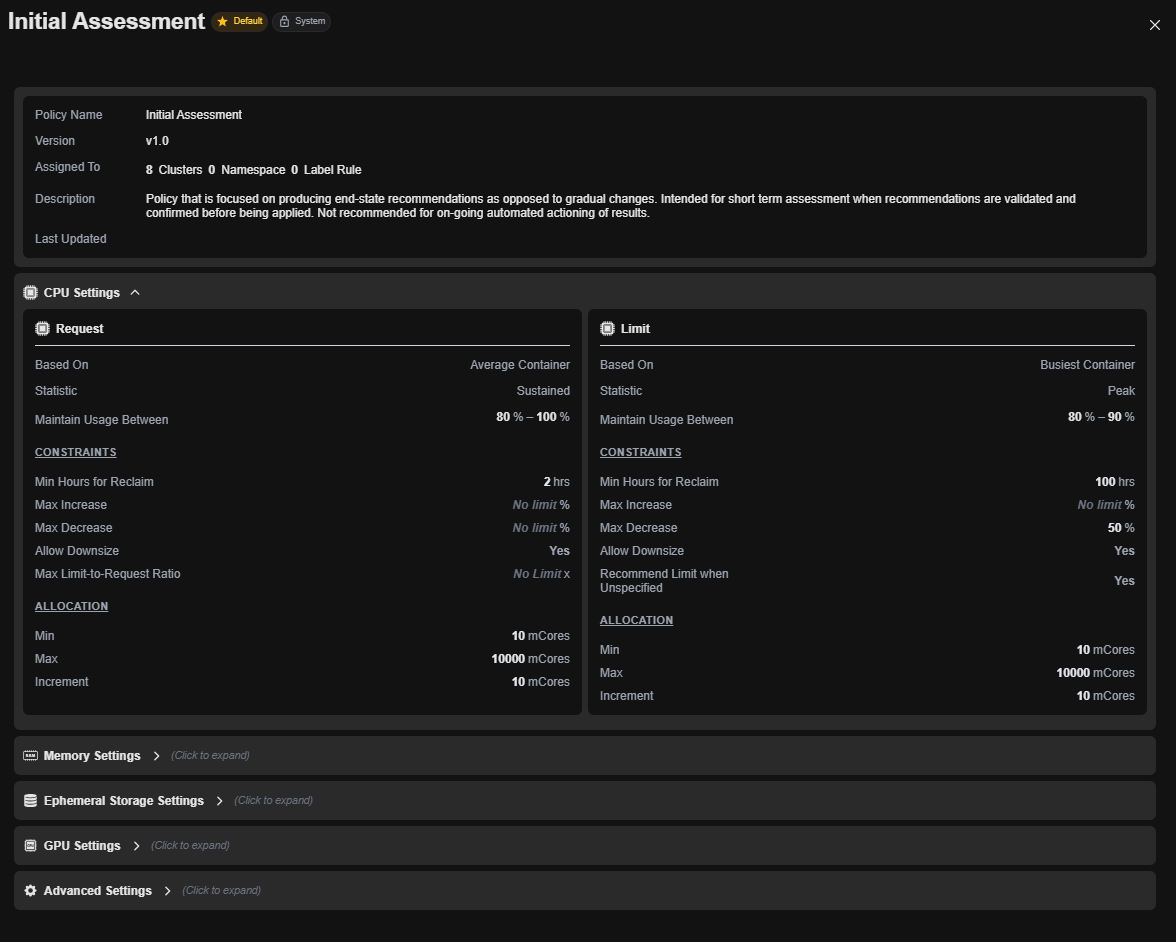
Kubernetes container optimization policies in Kubex define how the platform analyzes container workloads and generates resource recommendations. This page describes the key policy settings available in the container optimization policy dialog.

Operational Windowing

Operational Windowing settings control the time period and data samples used for analyzing container workloads.

Workload Range

The number of days of historical data used for workload analysis.
  • Default: 95 days
  • Purpose: Determines the lookback window for analyzing container behavior patterns
  • Considerations:
    • Longer ranges provide more comprehensive trend analysis
    • Shorter ranges focus on recent behavior
    • Should be sufficient to capture workload seasonality and growth trends

Include Weekends

Whether to include weekend operations in workload analysis.
  • Options: Yes / No
  • Default: Yes
  • Purpose: Determines if workload behavior differs significantly between weekday and weekend
  • Use Cases:
    • Enable if workloads operate 24/7
    • Disable if significant operational differences exist between weekdays and weekends

Include Samples Between

The percentile range of samples to include in analysis.
  • Default: 0 - 100 %ile
  • Purpose: Filters outlier data points from analysis
  • Options:
    • 0 - 100 %ile: Include all data
    • Custom ranges: Exclude extreme outliers (e.g., 5 - 95 %ile)

Exclude Hours

Hours of the day to exclude from workload analysis.
  • Purpose: Removes maintenance windows, batch processing, or non-production hours
  • Example: Exclude 2:00 AM - 4:00 AM for scheduled maintenance windows

Minimum Data for Analysis

These settings define the minimum historical data required before generating recommendations.

Days

Minimum number of days of data required before analysis begins.
  • Default: 1 day
  • Purpose: Ensures sufficient data coverage before providing recommendations
  • Considerations:
    • Higher values ensure more reliable analysis
    • Lower values enable faster recommendations for newly deployed workloads

Hours

Minimum number of hours per day of data collection required.
  • Default: 2 hours
  • Purpose: Ensures sufficient operational coverage within each day
  • Use Cases:
    • Set higher for business-critical workloads
    • Set lower for dev/test environments

CPU Settings

CPU policy settings control how Kubex sizes CPU requests and limits.

Size CPU Request

Defines the basis for CPU request recommendations.

Metric

  • Default: CPU Utilization in mCores - Container Average
  • Options:
    • Container Average: Uses average CPU consumption across all replicas
    • Busiest Container: Uses the highest consuming replica
  • Impact: Average-based sizing is more aggressive; busiest-based is more conservative

Statistic

The utilization trend used for sizing.
  • Default: Sustained
  • Options:
    • Sustained: Uses consistent, prolonged utilization patterns
    • Peak: Uses maximum observed consumption
    • Average: Uses arithmetic mean
  • Impact: Sustained reduces overprovisioning; peak ensures stability

Maintain Usage Between

The target utilization range when the system is properly sized.
  • Default: 100% - 100%
  • Purpose: Defines acceptable resource consumption relative to the request
  • Example:
    • 80% - 100%: Allows up to 20% headroom
    • 100% - 100%: Tight fit, no headroom

Size CPU Limit

Defines the basis for CPU limit recommendations.

Metric

  • Default: CPU Utilization in mCores - Busiest Container
  • Purpose: Limits should account for peak demands across all replicas
  • Typical Setting: Uses busiest container to prevent throttling

Statistic

  • Default: Sustained
  • Purpose: Ensures limits accommodate sustained peak demands

Maintain Usage Between

  • Default: 99999% - 99999%
  • Purpose: High percentages indicate limits should be generous to prevent throttling
  • Interpretation: Very high values mean “set limit above any observed demand”

CPU Allocation Range

Defines valid CPU resource allocation boundaries.
  • Range: 1 - 100000 mCores
  • Increment: 1 mCore
  • Purpose: Prevents unrealistic recommendations outside operational constraints
  • Customization: Adjust based on node sizes and cluster capabilities

Memory Settings

Memory policy settings control how Kubex sizes memory requests and limits.

Size Memory Request

Defines the basis for memory request recommendations.

Metric

  • Default: Memory (Total) Utilization - Container Average
  • Options:
    • Container Average: Uses average memory consumption
    • Busiest Container: Uses highest consuming replica
  • Purpose: Average-based sizing fits normal operation; busiest accommodates peak demands

Statistic

  • Default: Sustained
  • Purpose: Identifies consistent memory demands to prevent OOM conditions

Maintain Usage Between

  • Default: 100% - 100%
  • Purpose: Defines acceptable memory utilization
  • Considerations:
    • Memory should typically run higher than CPU (less headroom needed)
    • Too low utilization indicates overprovisioning
    • Too high risks out-of-memory errors

Size Memory Limit

Defines the basis for memory limit recommendations.

Metric

  • Default: Memory (Total) Utilization - Busiest Container
  • Purpose: Limits must accommodate peak memory demands across all replicas

Statistic

  • Default: Sustained
  • Purpose: Ensures limits support sustained peak consumption

Maintain Usage Between

  • Default: 99999% - 99999%
  • Purpose: Very high values prevent memory limit enforcement
  • Interpretation: Limits should be generous to avoid OOM kills

Memory Allocation Range

Defines valid memory resource allocation boundaries.
  • Range: 1 - 200000 MB
  • Increment: 1 MB
  • Purpose: Defines minimum and maximum memory sizes for recommendations
  • Customization: Adjust based on node memory and application requirements

Ephemeral Storage Settings

Ephemeral storage policy settings control how Kubex sizes container emptyDir and local storage.

Size Ephemeral Storage Request

Defines the basis for ephemeral storage request recommendations.

Metric

  • Default: Ephemeral Storage Usage (MB) - Average
  • Options:
    • Average: Uses typical storage consumption
    • Busiest Container: Uses peak consumption
  • Purpose: Request sizing should accommodate normal operations

Statistic

  • Default: Sustained
  • Purpose: Identifies baseline storage needs

Maintain Usage Between

  • Default: 80% - 100%
  • Purpose: Allows some headroom for growth without excessive allocation
  • Rationale: Storage is less critical than CPU/memory, allows tighter packing

Size Ephemeral Storage Limit

Defines the basis for ephemeral storage limit recommendations.

Metric

  • Default: Ephemeral Storage Usage (MB) - Busiest Container
  • Purpose: Limits must prevent storage-related pod evictions

Statistic

  • Default: Sustained
  • Purpose: Accommodates peak storage demands

Maintain Usage Between

  • Default: 100% - 100%
  • Purpose: Very tight fit prevents wasteful allocation
  • Impact: Limits set close to observed peak usage

Ephemeral Storage Allocation Range

Defines valid ephemeral storage allocation boundaries.
  • Range: 10 - 500000 MB
  • Increment: 10 MB
  • Purpose: Defines practical bounds for storage recommendations
  • Customization: Adjust based on node ephemeral storage capacity

Policy Best Practices

Conservative Deployment

For production environments with strict reliability requirements:
  • Use “Busiest Container” metrics for requests and limits
  • Set “Maintain Usage Between” to 70% - 90% for CPU/Memory
  • Increase Workload Range to 95+ days
  • Set higher Minimum Data requirements

Aggressive Optimization

For cost-sensitive environments with workload flexibility:
  • Use “Container Average” metrics for requests
  • Set “Maintain Usage Between” to 95% - 100%
  • Use shorter Workload Range (30-45 days)
  • Lower Minimum Data requirements

Balanced Approach

For typical enterprise environments:
  • Use “Container Average” for requests, “Busiest” for limits
  • Set “Maintain Usage Between” to 80% - 95% for CPU, 90% - 100% for Memory
  • Use standard 60-day Workload Range
  • Set reasonable (7+ day) minimum data requirements

Modifying Policies

Policies can be customized at the environment level to match your specific requirements. When modifying policies:
  1. Start with a default policy that matches your environment type
  2. Adjust one setting at a time and review results
  3. Validate recommendations with your infrastructure and application teams
  4. Document policy rationale for future reference
  5. Consider workload-specific policies for very different workload types
Work with your Kubex account manager to customize policies effectively based on your unique operational requirements and business objectives.