

Overview

Role-Based Access Control (RBAC) allows administrators to manage user permissions by assigning predefined roles. Each role grants access to specific features and capabilities within the platform, ensuring secure and efficient access management. Users can be assigned one or more roles depending on their responsibilities.

Available Roles

1. Analyst

Description: Provides access to explore and analyze data within the platform. Capabilities:
  • Access dashboards and analytics
  • Explore datasets and insights
  • View reports and metrics

2. Access Manager

Description: Responsible for managing users, groups, and access permissions. Capabilities:
  • Create and manage users
  • Assign roles and group memberships
  • Control access permissions

3. Connection Manager

Description: Manages integrations with external systems including cloud and container environments. Capabilities:
  • Connect K8s clusters to Kubex
  • Connect AWS, Azure and GCP connections to Kubex
  • Configure cloud and container integrations
  • Maintain and update connection settings

4. Policy Manager

Description: Handles creation and management of analysis policies. Capabilities:
  • Create and edit policies
  • Manage analysis rules
  • Govern policy enforcement across the platform

Assigning Roles

If using SSO

If you are using Single-Sign-On (refer: SSO Overview), you can map your user groups to specific roles in Kubex. By default, the following user groups are mapped to roles as described above:
  • KUBEX_USER -> Analyst
  • KUBEX_USER_ADMIN -> Access Manager
  • KUBEX_AUDIT_ADMIN -> Connection Manager
  • KUBEX_POLICY_ADMIN -> Policy Manager
You can create these user groups in your identity provider and assign users to them. Once SSO is configured, Kubex will automatically provision users with the appropriate roles. If you need to map existing user groups to Kubex roles, contact support@kubex.ai to request an update to the mapping.

If not using SSO

To assign roles to a user:
  1. Navigate to the User Management section.
  2. Edit or create a user and assign the desired role(s) using the checkboxes.
  3. Save the changes to apply permissions.
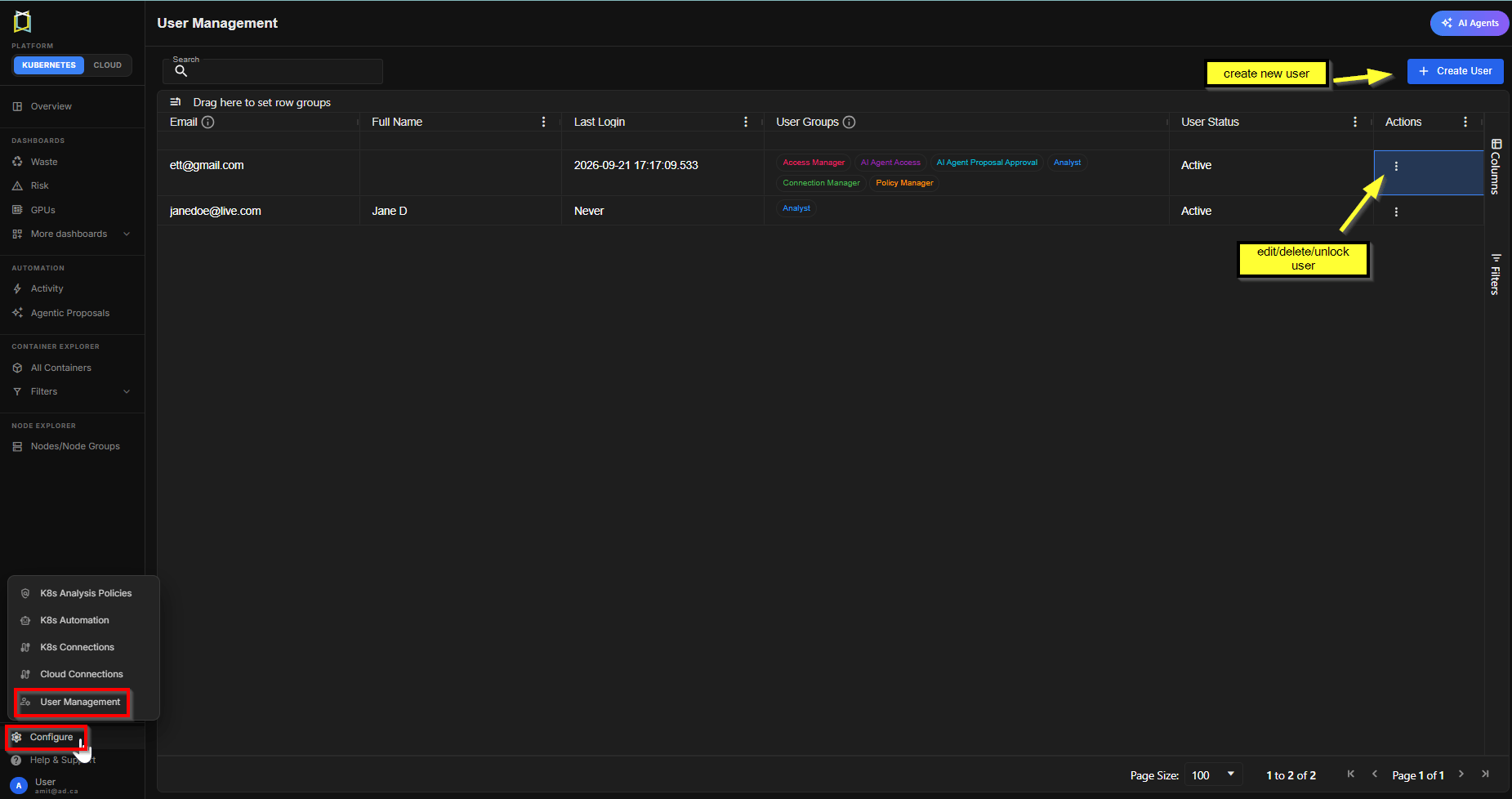
Users can have multiple roles assigned simultaneously, combining permissions across roles.

Best Practices

  • Principle of Least Privilege: Assign only the roles necessary for a user’s responsibilities.
  • Separation of Duties: Avoid assigning conflicting roles to the same user.
  • Regular Audits: Periodically review role assignments to ensure compliance.

Summary

RBAC simplifies access control by grouping permissions into roles. By assigning appropriate roles, organizations can ensure users have the right level of access while maintaining security and governance.