
Using the AI Agent
The Kubex AI Agent enables you to interact with the Kubex application using natural language queries. This intelligent assistant helps you navigate the platform, understand your data, and get insights without needing to know specific menu paths or technical terminology.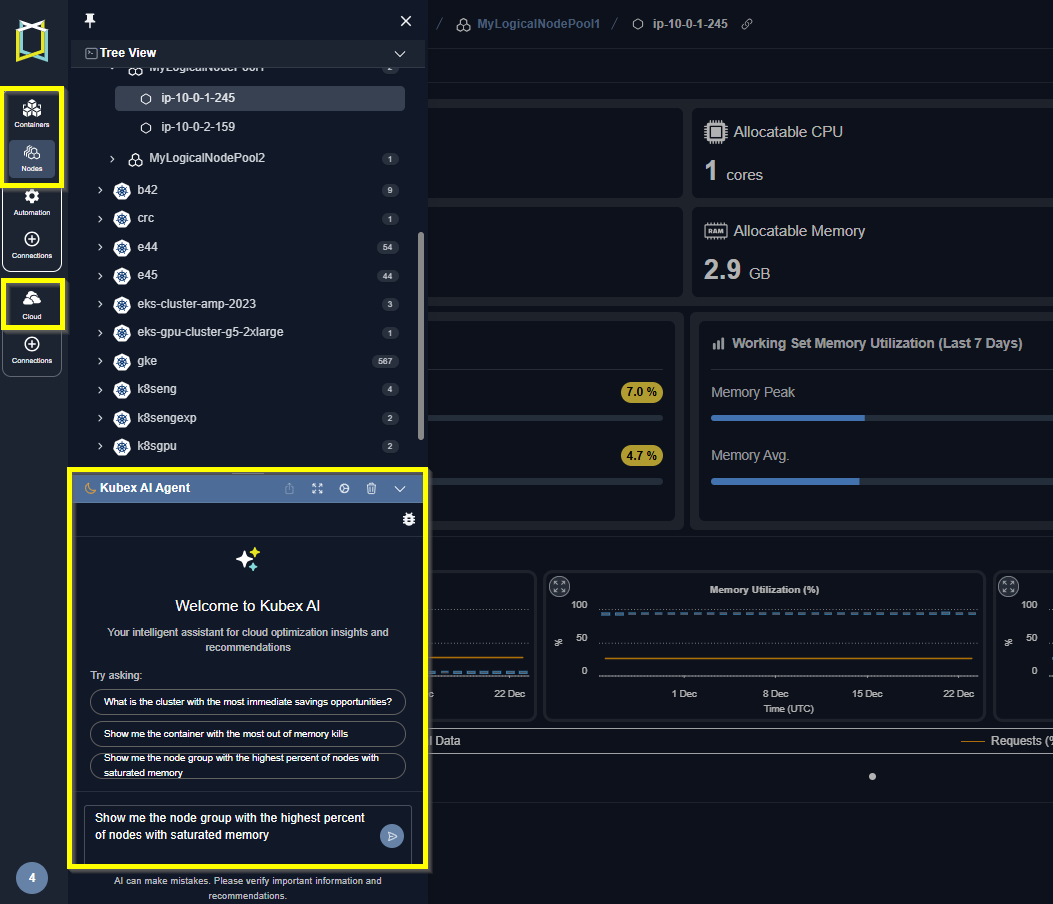
Figure: Locating the Node Overview
Getting Started with Natural Language Queries
Simply ask questions about your Kubernetes environment in plain English. The AI Agent understands context and can help you:- Find specific information about your clusters, nodes, or containers
- Understand optimization recommendations
- Navigate to relevant features and reports
- Interpret analysis results and metrics
- Get explanations of Kubex terminology and concepts
Sample Prompts to Get You Started
To help you begin using the AI Agent effectively, several pre-written prompts are available. These examples demonstrate the types of questions you can ask and the insights you can gain: Resource Optimization Queries:- “What is the cluster with the most immediate savings opportunities?”
- “Show me the container with the most out of memory kills?”
- “Show me the node group with the highest percent of nodes with saturated memory?”
- “How do I view my cluster efficiency ratings?”
- “Where can I find automation results?”
- “Show me the policy details for my analysis”
Privacy and Data Security
Your data privacy and security are paramount. The Kubex AI Agent operates with the following privacy protections:- No Training on Customer Data: Your organizational data, cluster information, and usage patterns are never used to train or improve the AI model
- Secure Processing: All queries are processed securely within the Kubex environment
- Data Isolation: Your data remains completely isolated and is not shared with external systems or other customers
- Privacy by Design: The AI Agent is designed to provide assistance while maintaining complete confidentiality of your infrastructure data
Best Practices for Using the AI Agent
Be Specific: While the AI Agent understands natural language, more specific questions typically yield better results.- Instead of: “Show me problems”
- Try: “Show me containers with high CPU utilization and waste”
Getting Help
The AI Agent can also help you understand how to use Kubex itself. Ask questions like:- “How do I export analysis results?”
- “What’s the difference between the Summary and Analysis Details tabs?”
- “How do I set up automation for my recommendations?”